Data Engineering
  Data Strategy + Governance
  Data Migrations
  Concierge + Support
  Artificial Intelligence
  Training + Enablement
  Data Analytics + Insights
  Financial Services
  Communications, Media + Entertainment
  Healthcare + Life Sciences
  Technology + Digital Natives
  Manufacturing + Automotive
  Public Sector
  Retail + Consumer Goods
  Race to the Lakehouse
  AI + Data Maturity Assessment
  Unity Catalog
  Rapid GenAI
  Modern Data Connectivity
  Gatehouse Security
  Health Check
  Sample Use Case Library
  Blog
Blog  Events
  About Us
  Careers
  Founding Team

It is 8:12 AM on a Tuesday. A sales pipeline failed overnight, the revenue dashboard is now showing yesterday’s number, and a feature pipeline depending on the same stale Gold sales table is raising drift alerts in MLflow. The data engineer opens Lakeflow, the BI developer checks the dashboard calculation, and the ML engineer pulls up run history. Three people, one platform, one broken chain of context. Databricks Genie Code is interesting because it can work inside that chain instead of sitting beside it.
Most AI coding tools are built around a simple assumption: the code is the product. For data teams, that assumption is incomplete. The code is only the interface to something messier: governed datasets, business definitions, lineage, permissions, production pipelines, dashboards, model endpoints, and operational reality.
That is the useful lens for Genie Code. It is not just a faster way to produce SQL or Python. Its value shows up when the assistant can reason across the Databricks environment: the tables, notebooks, dashboards, jobs, lineage, permissions, and conventions that define how data work actually gets done. Used well, Genie Code becomes a workflow assistant for governed data engineering, analytics, BI, and ML work inside Databricks.
That makes Genie Code part of the broader Databricks Data Intelligence Platform story: reducing the distance between data, AI, governance, and the teams that operate them. The productivity gain is not only faster code generation. It is less context switching, fewer handoffs between tools, and a shorter path from a governed data asset to a working pipeline, dashboard, or model investigation.
Databricks has also published its own outcome-oriented credentials for this direction. In the Genie Code launch article, Databricks says Genie Code more than doubles the success rate of leading coding agents on an internal benchmark of real-world data science tasks, and reports a 77.1% to 32.1% quality result against a leading coding agent on internal data science tasks. I would treat those as Databricks internal benchmark claims, not as a substitute for measuring impact in your own environment, but they are useful evidence for why the category deserves attention.
What this article covers: how Genie Code differs from the old Databricks Assistant, where it fits next to Genie Agents and Genie One, why Unity Catalog metadata is the real leverage point, how to prompt it like a delegated workflow, what early practitioner observations suggest, and the operating model I would use before rolling it out across a data team.
The Assistant Era Was Too Small
The first generation of AI assistants inside data platforms mostly helped with local tasks: write a SQL query, explain a notebook cell, fix a PySpark error, summarize a stack trace. Useful, but narrow. The assistant waited for you to know where the data was, which table mattered, what the pipeline was supposed to do, and which metric definition was safe to use.
Databricks positions Genie Code as an assistant for technical practitioners, but the definition undersells the design choice that matters: Genie Code does not live in an IDE waiting for code to review. It is embedded in the surfaces where data work already happens: a notebook mid-exploration, the SQL editor, a Lakeflow pipeline under construction, a dashboard being tuned, an MLflow run being investigated. It carries Unity Catalog’s knowledge of tables, columns, and lineage into each of those surfaces. It can write code, but it can also run it, build the pipeline, and debug the failure, because it has standing in the environment rather than just the file.
The Data + AI Summit 2026 updates make that workflow framing even clearer. Databricks introduced a full-page Genie Code command center for longer-running work, with multiple threads, status visibility, review points, and easier access to instructions, skills, and connectors. That matters because serious data work rarely fits into a single prompt; it usually requires investigation, execution, review, and iteration across several assets.
That matters because data work is full of hidden context. A generic code assistant can write a function. A data-native agent has a better chance of knowing which table is authoritative, which columns are sensitive, what lineage already exists, and which assets are popular or trusted inside the organization. The difference is not that Genie Code can produce Python faster. The difference is that it can operate closer to the governed system of record.
First, Untangle the Genie Naming
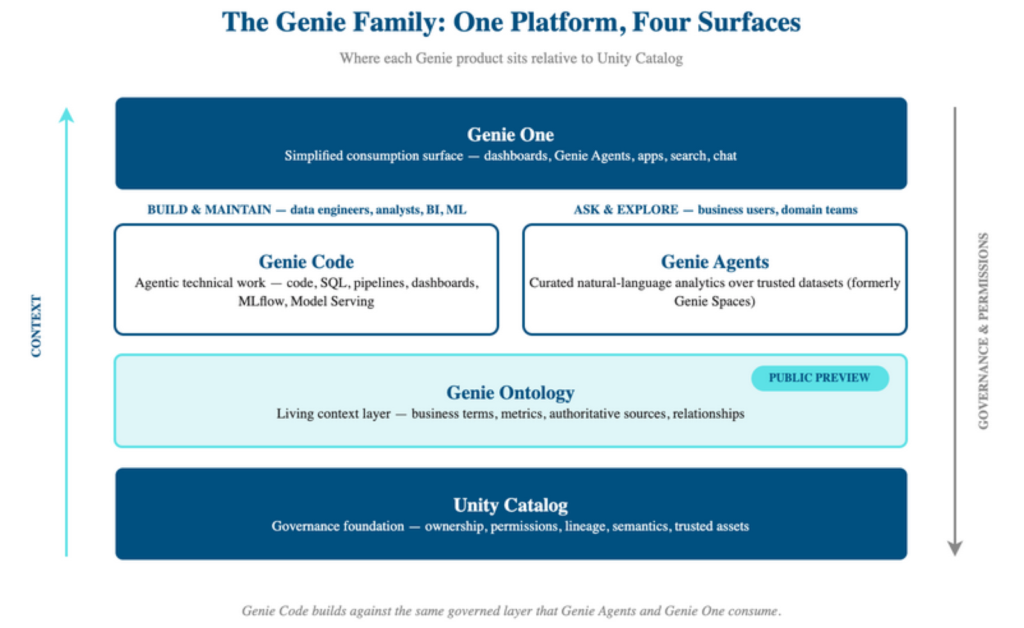
Before going deeper, the naming needs a reset. Databricks has moved several AI experiences under the Genie family, and they are not interchangeable.
| Product | Primary User | What It Is For |
| Genie Code | Data engineers, analysts, BI developers, ML practitioners | Agentic technical work: code, SQL, pipelines, dashboards, MLflow, Model Serving, debugging |
| Genie Agents | Business users, analysts, domain teams | Curated natural-language analytics over trusted Unity Catalog datasets for business users and domain teams. |
| Genie One | Business users and consumers | A simplified Databricks UI for dashboards, Genie Agents, Databricks Apps, search, chat, and business-facing data interaction. |
| Genie Ontology | Genie One, Genie Agents, and context-aware assistants | A Public Preview context layer that automatically builds and updates a map of business terms, metrics, authoritative sources, and relationships from Databricks assets and connected tools. |
The easiest way to remember the split: Genie Code is where technical teams build and maintain things. Genie Agents are where business users ask curated questions of governed data. Genie One is the consumption experience that pulls dashboards, agents, apps, and search into a simpler interface. Genie Ontology is the context layer beneath that experience, helping Genie identify which definitions, assets, and sources are most trustworthy.
The Real Differentiator Is Context, Not Chat
Every agent demo looks impressive when the prompt is clean and the dataset is obvious. The real question is what happens when the workspace has hundreds of tables, partial documentation, old notebooks, stale dashboards, and three definitions of revenue.
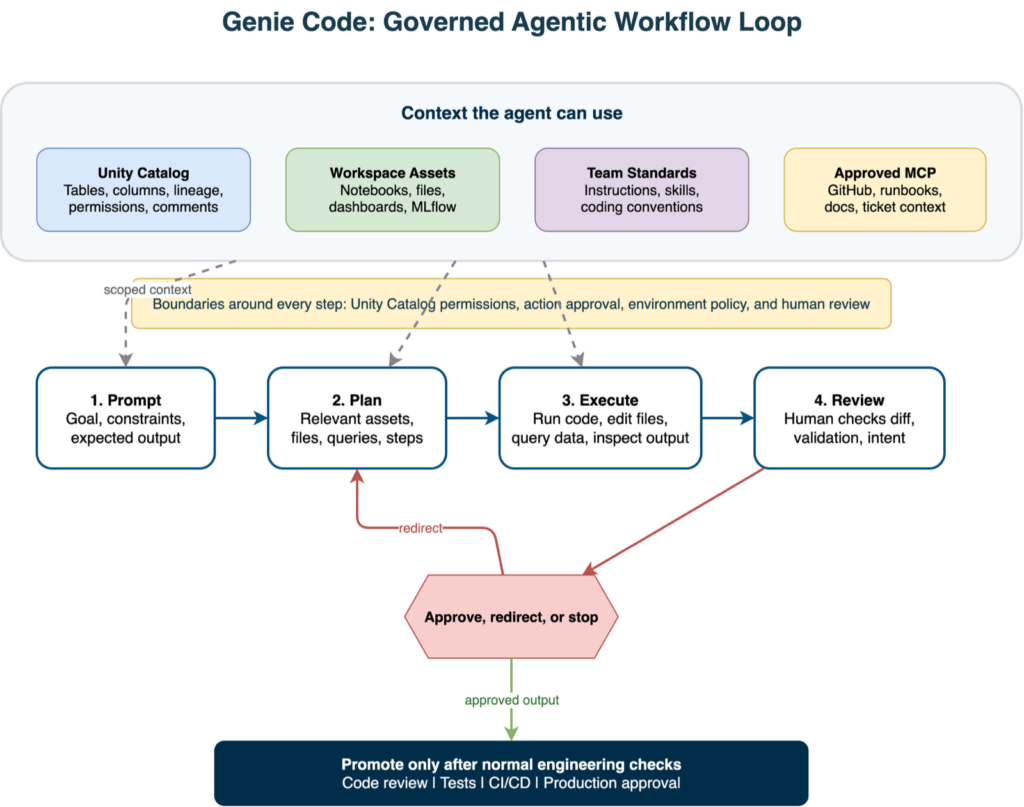
This is where Genie Code’s Databricks-native position matters. Its context comes in two flavors, and the distinction matters operationally. Ambient context is what the platform already knows: Unity Catalog metadata, table and column comments, lineage, and the notebooks, files, and dashboards in the workspace. Directed context is what you hand it deliberately: an @table reference, an attached file, a specific failing cell, or an approved external system reached through MCP. The ambient layer is only as good as your governance hygiene; the directed layer is only as good as your prompt discipline. Weakness in either shows up as guessing.
In that sense, Unity Catalog is not just background metadata. It is the control layer that makes agentic work more practical: the same catalog that defines ownership, access, lineage, and semantics also gives the assistant better context for discovery, planning, and review.
Recurring observations from early users line up with the official guidance: the better the context, the better the result. If your Unity Catalog tables have useful comments, if business terms are encoded in metric views, if trusted datasets are obvious, Genie Code has something real to work with. If your schema is a swamp of cryptic column names and undocumented joins, the agent will spend more effort guessing.
What Early Practitioners Are Seeing
Early practitioner discussion around Genie Code is useful because it focuses on failure modes. The recurring lesson is that agentic tools are powerful precisely because they can act. That means teams need operating discipline, not just better prompts.
Start a New Thread for Unrelated Work
Several practitioners call out context contamination. If you reuse the same chat for a different dataset, a different pipeline, or a different business domain, previous assumptions can leak into the new task. Use one thread per coherent workflow. Rename threads by asset or objective. If the agent starts mixing context, stop and reset.
Point at the Asset, Not the Idea
Genie Code has broad workspace context, but broad is not the same as precise. Use @table, selected notebook cells, files, dashboard references, and concrete catalog paths. When debugging, point it at the failing run, the notebook cell, the error output, and the expected behavior. Do not make it infer the entire problem from “this pipeline is broken.”
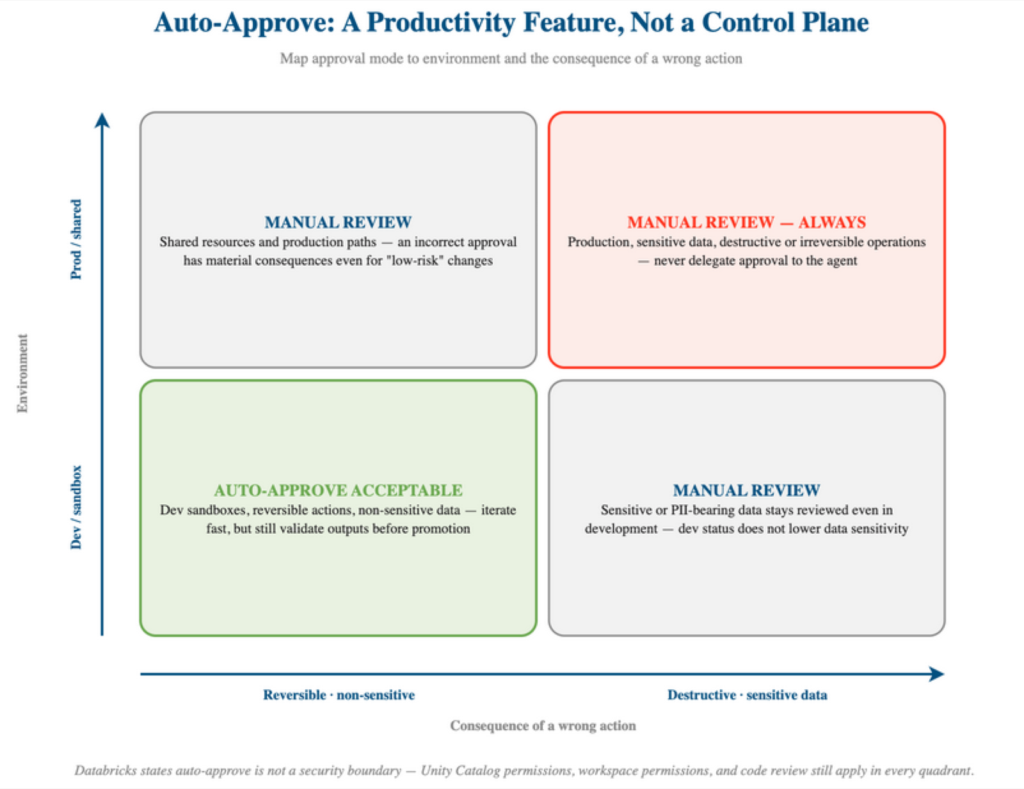
If the agent starts looping, interrupt early and narrow the task. If it proposes file edits, pipeline changes, dashboard configuration, or Genie Agent updates, review the generated code and configuration every time. The more capable the tool becomes, the less safe it is to approve everything without thinking, especially outside development workspaces.
Auto-approve is a productivity feature, not a control plane. Databricks explicitly warns that auto-approve is not a security boundary. Keep manual review in production, sensitive data environments, shared resources, and any workflow where an incorrect approval has material consequences.
Unity Catalog Metadata Is the Work You Do Before the Prompt
The strongest community pattern is also the least glamorous: good Genie outcomes start with governed data modeling. One Reddit discussion put it bluntly: Genie best practices are data governance best practices. That statement is about Genie Agents, but it applies just as strongly to Genie Code.
If business users say “buy site” and the column is named lct_string, the agent has to guess. If revenue is calculated differently across dashboards, it has to choose a definition. If relationships are implicit in old notebooks, it has to reconstruct joins from scattered examples. None of this is unique to AI; it is the same data maturity problem teams already had. Genie Code just makes the cost of weak metadata more visible.
The practical checklist is simple: table and column comments, metric views for key measures, trusted assets, simple curated schemas, clear owners, and visible lineage. This also explains why Genie Code can be useful when building Genie Agents. The “one prompt” examples work best when the data was already prepared.
Encode Team Knowledge, Then Add External Context
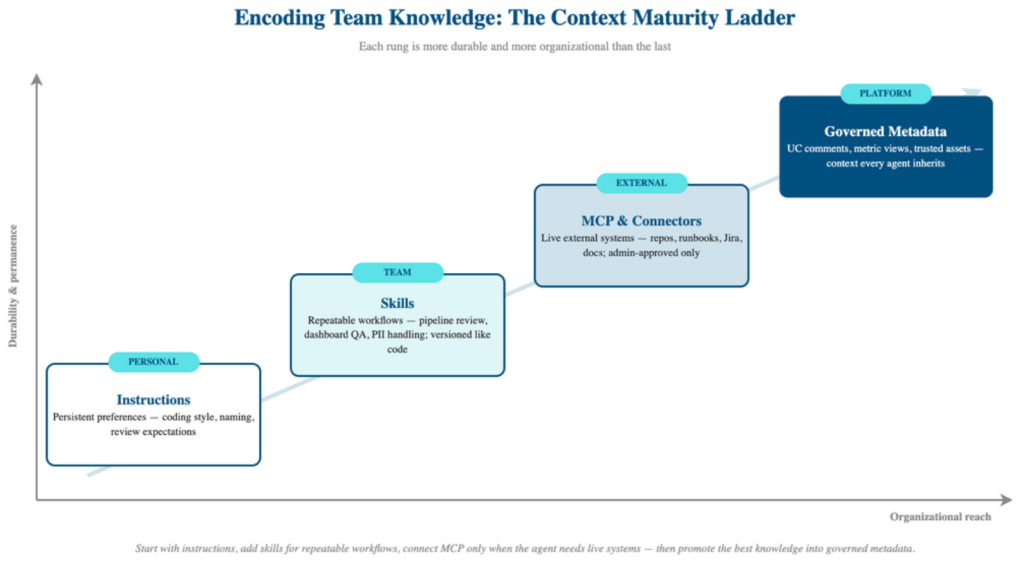
Repeating standards in every prompt does not scale. Instructions are useful for persistent guidance, but skills are where Genie Code becomes an organizational tool rather than a personal assistant.
Skills package domain-specific workflows, examples, reusable code, reference files, and scripts. They are better than global instructions when the behavior is specific: reviewing Lakeflow pipelines, applying PII rules, enforcing dashboard QA, or creating a Genie Agent from a curated schema. The goal is to encode the checklist once and make the agent load it when relevant.
| Mechanism | Best For | Do Not Use It For |
| Instructions | Persistent preferences: coding style, naming conventions, review expectations, environment boundaries. | Long procedures, examples, reusable scripts, or task-specific checklists. |
| Skills | Repeatable workflows: pipeline review, dashboard QA, Genie Agent setup, PII handling, MLflow evaluation. | Broad organizational policy that should apply to every task regardless of context. |
| MCP and connectors | External systems: GitHub repositories, runbooks, Jira requirements, docs, metadata tools, or operational APIs. | Static knowledge that could be captured in Unity Catalog comments, instructions, or a skill file. |
Beyond the workspace boundary, MCP servers and native connectors bring in the systems where enterprise context actually lives: the GitHub repository holding production pipeline code, the runbook in SharePoint or Confluence, requirements sitting in Jira, and tribal knowledge captured in Slack threads. At the time of writing, MCP behavior and limits should be checked against the current documentation for the target cloud and region, especially for external servers and native connectors.
The right use case is not “connect everything.” It is “give the agent access to the source of truth it actually needs”: a GitHub repository with production pipeline code, an incident runbook, Jira requirements, or a data dictionary that has not yet been migrated into Unity Catalog.
Where Genie Code Fits in Real Workflows
Data Engineering: Lakeflow & Pipeline Operations
Genie Code is most obviously useful in data engineering because pipelines already have a natural task structure: find the source, transform the data, define quality rules, orchestrate the run, debug failures, and validate outputs. In Lakeflow, Agent mode behaves less like autocomplete and more like a junior engineer working under supervision: given a goal, it works out an approach, pulls in the workspace assets it needs, executes, reads its own outputs, and retries on failure, pausing for approval at each consequential step.
The practical boundary is important: pipeline development with Genie Code is marked Public Preview in the current documentation. It is a strong place to experiment and a useful acceleration layer, but generated pipeline logic still deserves the same review and test discipline as code written by a person.
Analytics and BI: Dashboards with Semantic Discipline
Genie Code can help create AI/BI dashboards, generate visualizations, configure filters, and build calculations. This is useful for analysts and BI developers, not just data engineers. One community example noted that Genie Code respected visualization instructions such as avoiding pie charts. That sounds small, but it points to the larger pattern: style, metric, and design preferences should be encoded as reusable instructions, not retyped every time.
ML and GenAI: MLflow, Model Context, & Observability
Databricks has been expanding Genie Code into the ML stack through MLflow context, model lineage, run history, debugging support, and optimization recommendations. This is where the “data-native” framing matters again. A generic coding agent can write training code. A Databricks-native agent can reason closer to the runs, artifacts, metrics, and lineage that explain how the model is actually operated.
The Data + AI Summit 2026 announcements push this further into production ML engineering. Databricks described Genie Code as gaining stronger context across MLflow, Model Serving, compute selection, and team-specific modeling patterns through Genie Ontology. The practical implication is that Genie Code is becoming less of a notebook helper and more of an assistant for the surrounding ML workflow: feature creation, experiment comparison, serving diagnosis, and operational review.
Genie Agents: Build the Conversational Layer, Then Test It
Genie Code can also help technical teams create and tune Genie Agents, but the same rule applies: the agent is only as good as the governed data layer beneath it. Use curated tables, metric views, example SQL, starter questions, and clear instructions. Then test. For teams serious about this workflow, Genie Workbench is worth watching: it is a Databricks App for creating, scoring, and optimizing Genie Agents, including rule-based scans and benchmark-driven optimization.
Where Genie Code Provides the Most Value in Practice
Based on my experience using Genie Code in Databricks projects, its biggest advantage is not general-purpose code generation. Coding assistants such as Codex, Claude Code, GitHub Copilot, Cursor, and similar IDE or terminal agents are already strong at code completion, refactoring, unit tests, and implementation work. Genie Code becomes more valuable when the task depends on Databricks-specific context, workspace assets, or enterprise data.
Notebook Development & Rapid Experimentation
Genie Code works particularly well in notebooks during data exploration and early solution testing. It can create SQL or PySpark snippets, validate an implementation idea, and produce a first version of an analysis that an engineer can review and refine manually. That shortens the path from a business question to a working prototype, as long as the generated cells remain reviewable.
Exploring Data Through Unity Catalog
One capability that consistently stands out is matching business questions to data available in Unity Catalog. In large enterprise environments, finding the right catalog, schema, table, and columns can take significant time. Genie Code can use catalog metadata and workspace context to identify relevant datasets and suggest a starting point for analysis. The agent is not only writing code; it is helping the user understand the data landscape.
Extending Genie Code with Domain-specific Skills
Skills are where Genie Code starts to behave less like a generic assistant and more like a team member familiar with your platform. Databricks ships built-in skills for common workflows such as notebooks, Unity Catalog exploration, dashboards, pipelines, and MLflow. Custom skills extend that idea to the work that is specific to a team: how pipelines should be reviewed, how dashboards should be checked, how sensitive columns should be handled, or how a Genie Agent should be evaluated before release.
The key design principle is that a skill should be narrow enough to be useful. A weak skill says “follow our best practices.” A useful skill contains the review checklist, examples of accepted patterns, anti-patterns to avoid, sample SQL or PySpark, validation steps, and links to reference files. It does not replace engineering judgment, but it gives the agent the same starting material a senior teammate would hand to a new engineer.
A useful community example is Prompt-to-Genie by Sean Zhang. It is not an official Databricks product, but it shows the pattern well: a skill that guides the creation, audit, diagnosis, and optimization of Genie Agents. Rather than only telling Genie Code what to code, it teaches the agent how to clarify requirements, profile Unity Catalog tables, capture business logic, generate structured configuration, validate the result, and iterate.
Public repositories worth studying include Databricks Agent Skills, the Databricks AI Dev Kit, Genie Code Skills Demo, DQX, and Lakebase App Dev Kit. I would treat these as reference implementations, not production artifacts to install unchanged. The more valuable move is to copy the pattern, then encode your own standards.
| Starter Skill | What It Should Teach Genie Code | Why It Matters |
| Lakeflow pipeline review | Expected medallion structure, quality rules, retry behavior, naming conventions, and validation queries. | Turns pipeline generation into a reviewable workflow instead of a one-shot code suggestion. |
| Unity Catalog governance | PII classification rules, owner expectations, table comment standards, metric view usage, and access boundaries. | Helps the agent preserve governance instead of working around it. |
| Genie Agent curation | How to select tables, write descriptions, define example questions, test generated SQL, and diagnose weak answers. | Improves the semantic layer that business-facing agents depend on. |
| Dashboard QA | Approved chart patterns, filter behavior, metric definitions, performance checks, and accessibility expectations. | Makes AI/BI output more consistent and less dependent on prompt quality. |
| MLflow evaluation | Required metrics, run comparison steps, model lineage checks, and release evidence before deployment. | Connects model development assistance to operational review instead of only code generation. |
I would version these skills like code. Keep them small, review changes through pull requests, include examples that reflect real assets, and retire skills that no longer match the platform. A stale skill is worse than a missing skill because it gives the agent confident instructions that the team no longer follows.
This is the maturity ladder I would aim for: start with instructions for universal preferences, add skills for repeatable team workflows, connect MCP only when the agent needs external tools or live systems, and gradually move the best organizational knowledge into governed metadata, reusable templates, and reviewed skill files.
Databricks Platform Diagnostics
Genie Code can also support operational analysis inside Databricks. Practical examples include investigating failed Jobs, reviewing MLflow run context, explaining platform-specific errors, and suggesting likely root causes based on workspace and platform context.
A generic coding assistant can explain an isolated stack trace. Genie Code is more useful when the answer depends on surrounding Databricks assets, permissions, job configuration, endpoint behavior, lineage, or data state.
General Coding Assistants & Genie Code Are Complementary
In environments where multiple AI coding tools are available, I would not frame the decision as one assistant versus Genie Code. They solve different parts of the work.
| General Coding Assistants | Genie Code |
| Code completion and IDE productivity | Databricks workspace and data context |
| Refactoring, unit tests, and general programming | Unity Catalog exploration and governed data discovery |
| Language and framework knowledge | Lakeflow, notebooks, Jobs, Genie Agents, and Serving Endpoints |
| Local implementation tasks | Platform-specific diagnosis and workflow planning |
The practical distinction is not simply which assistant generates better code. General-purpose coding assistants primarily understand the code being developed. Genie Code can also understand the Databricks environment in which that code and data operate.
Knowing the Boundaries
The more capable the assistant becomes, the more explicit the boundaries need to be. These are the limits I would make visible before a broader rollout.
- It is not a general-purpose coding assistant. Databricks positions generated code as optimized for Databricks compute, supported languages, frameworks, and dialects. Use it where Databricks context matters; do not expect it to replace every software engineering tool in the stack.
- It is not a data modeling substitute. If trusted tables, business definitions, ownership, and metric views are weak, Genie Code will inherit that ambiguity. Better prompts help, but they do not replace a governed semantic layer.
- It is not a security boundary. Unity Catalog permissions, workspace permissions, production approval, and code review still matter. Auto-approve should stay away from production, sensitive data, shared assets, and destructive operations.
- Some capabilities are still preview-stage. Full-page Genie Code is currently marked Beta, Genie Code for pipeline development is Public Preview, and Genie Ontology is Public Preview in Genie One. Use that knowledge when deciding where each capability belongs in a production path.
- Some announced capabilities are not general rollout assumptions yet. Databricks has announced scheduled tasks for Genie Code as coming soon. Treat that as product direction, not as a capability to depend on in a current production operating model.
- Data residency needs a real check. Genie Code is documented as a Designated Service that uses Geos. Regulated organizations should review regional availability and cross-Geo processing settings before enabling it broadly.
- Cost is more than prompt usage. Pricing changed on July 8, 2026: each user gets a free monthly allowance, and consumption beyond it is metered pay-as-you-go, separate from the ordinary Databricks compute that generated queries, jobs, and pipelines still consume.
- MCP expands the blast radius. External connectors should be treated as governed integrations. Admins should approve MCP servers, users should enable only what they need, and secrets or production credentials should not leak into prompts.
A Practical Rollout Model
I would not start by turning Genie Code loose across every workspace and asking everyone to “use AI more.” That usually produces scattered wins and inconsistent risk. I would start with a narrow pilot, a few explicit controls, and an agent-readiness pass over the workflows where Genie Code has a realistic chance to reduce cycle time without weakening control.
Prerequisites Before the Pilot
- Account and workspace AI settings. Confirm that partner-powered AI features are enabled for both the account and the workspace. Without them, Genie Code can remain available, but without its agentic capabilities.
- Supported region and residency decision. Check Genie Code availability for the workspace region, review Geos and cross-Geo processing settings, and confirm whether external MCP servers are available in that region.
- Compute and environment boundaries. Decide where generated code can run, which serverless usage policy applies, and how dev, test, and production workspaces are separated.
- Unity Catalog permissions. Restrict the pilot to assets with clear owners, least-privilege access, documented sensitive fields, and known trusted tables.
- Connector preview posture. If native connectors are part of the pilot, have an admin explicitly enable the third-party connectors preview, document OAuth scope, and account for connector limitations such as file size, unsupported binary files, and GitHub enterprise access.
| Workstream | What to Check | First Deliverable |
| Metadata readiness | Top tables, column comments, owners, metric definitions, lineage, sensitive fields, and trusted assets. | A prioritized Unity Catalog cleanup list focused on the workflows Genie Code will touch first. |
| Workflow selection | Where teams lose time today: failed pipelines, dashboard iteration, Genie Agent setup, model diagnostics, or incident triage. | Two narrow pilot workflows with clear success criteria and clear environments. |
| Instructions and skills | Existing coding standards, deployment rules, naming conventions, PII handling, dashboard QA, and pipeline review practices. | Workspace instructions plus one or two reusable skills that encode real team standards. |
| Approval and access model | Dev/prod separation, who can run what, where auto-approve is acceptable, and which MCP servers are allowed. | An approval policy that maps action risk to environment, data sensitivity, and ownership. |
| Impact measurement | Adoption, engagement, satisfaction, time saved, accepted changes, rejected changes, and validation failures caught early. | A lightweight impact dashboard and review cadence for the pilot. |
That keeps the rollout practical. The first goal is not to make every Databricks user an agent power user. The first goal is to prove that one or two governed workflows can move faster, with better context, less rework, and no ambiguity about who owns the result.
A cheap prompt can still author a query that costs real money, which is why budget controls belong in the pilot design, not the retrospective.
Databricks now provides guidance for measuring Genie Code impact through adoption, engagement, and satisfaction signals. I would use that as a starting dashboard, then add team-specific review metrics: accepted changes, reverted changes, failed validations caught before production, prompt patterns that worked, review iterations reduced, and workflows where the agent repeatedly needed correction. The point is not to prove that “AI was used.” The point is to learn where it improves delivery and where the process still needs better context, tests, or boundaries.
The Bottom Line
Genie Code is strongest when it is treated as a governed agentic workflow layer, not as a magic SQL writer. It can find assets, propose plans, generate and run code, inspect outputs, modify pipelines, help with dashboards, and operate closer to MLflow and Model Serving than a generic coding assistant can. That is real leverage.
But the leverage depends on the platform around it. If your Unity Catalog metadata is weak, if your metric definitions are tribal knowledge, if everyone has broad production permissions, and if code review is optional, Genie Code will not fix the operating model. It will simply move faster inside it.
The teams that benefit most will be the teams that already understand the hard part of enterprise AI: trusted data, explicit semantics, versioned workflows, least privilege, validation, and review. Genie Code does not remove those responsibilities. It makes them more valuable.
The agent is only as good as the system of context and control around it.
Entrada runs fixed-scope Genie Code readiness assessments covering Unity Catalog metadata, approval models, and pilot workflow selection. Contact us.