Data Engineering
  Data Strategy + Governance
  Data Migrations
  Concierge + Support
  Artificial Intelligence
  Training + Enablement
  Data Analytics + Insights
  Financial Services
  Communications, Media + Entertainment
  Healthcare + Life Sciences
  Technology + Digital Natives
  Manufacturing + Automotive
  Public Sector
  Retail + Consumer Goods
  Race to the Lakehouse
  AI + Data Maturity Assessment
  Unity Catalog
  Rapid GenAI
  Modern Data Connectivity
  Gatehouse Security
  Health Check
  Sample Use Case Library
  Blog
Blog  Events
  About Us
  Careers
  Founding Team

Databricks Native Solutions
As of PySpark version 3.5, Spark offers native libraries for testing which are quick and convenient ways to check for equality. However, these checks are done in memory, so they don’t scale to large volumes of data, and the tests themselves are limited. These are good for adhoc analysis rather than a true, fully fledged data quality framework.
Databricks also offers concepts such as Lakehouse Monitoring and data profiling. These are nice for understanding trends in your data on individual table levels, but they do not compare different datasets to each other. They are higher-level processes that look at the overall data rather than doing any discrete checks.
Lastly, Databricks offers a proactive data quality solution in Declarative Pipelines with their concept of expectations. These are highly customizable and useful when you know what to expect of your data, but they are limited to individual tables and they operate on a row-level (not aggregate level).
Third Party Solutions
Databricks Labs offers their own open source data quality framework called DQX. This is more involved than the native Databricks solutions and can be easily installed on any Databricks cluster. There are a ton of varieties of tests that can be run and it’s quite comprehensive for what it is. The main purpose of DQX is building business rules and ensuring compliance with them across dataframes. Great Expectations is another similar popular open source framework, and there are some other Python libraries that accomplish similar (many for Pandas and Dask dataframes).
But what if you want a more holistic view of your entire data landscape, and to compare data across tables and apply business rules? These concepts are particularly important in regard to data migrations and promoting datasets across environments. With the popularity of Databricks ever increasing, more and more organizations are migrating from their legacy systems to the platform. One of the most challenging parts of data migrations is ensuring that there were no accidental data quality issues introduced, but these can be sneaky and unturning every stone greatly reduces migration velocity, many of which have tight timelines.
What if that monotonous part of migrations could be automated, and even embedded into your existing CI/CD processes? What if the same concept of confirming migration parity with a tool could be applied to promoting tables from, say, development to production environments? What if you want to see how your data quality has changed over time, and not just in that exact moment?
The DataPact Solution

This is where the previously mentioned tools fall short, and why Entrada created DataPact to fill the void. DataPact was built out of a large-scale data migration, and has since evolved to be a core part of any CI/CD solution, not just migrations (although it still excels here as well). DataPact is built for scale (you can add an arbitrary number of tables to test), easy to adopt (no coding necessary – everything is config based), and provides extreme visibility into your data (there are automated data quality dashboards created and refreshed as well as skeleton Genie rooms – we call this data forensics).
DataPact is 100% run on Databricks, and the only requirement to use it is a Databricks account. You can even run it locally! (Or from a dedicated Databricks cluster, if you prefer.) DataPact is meant to mimic existing Databricks Labs tools like UCX, in that it is primarily a CLI tool that doesn’t take much computation to run itself, and DABs, in that it is config-based (YAML) rather than coding based.
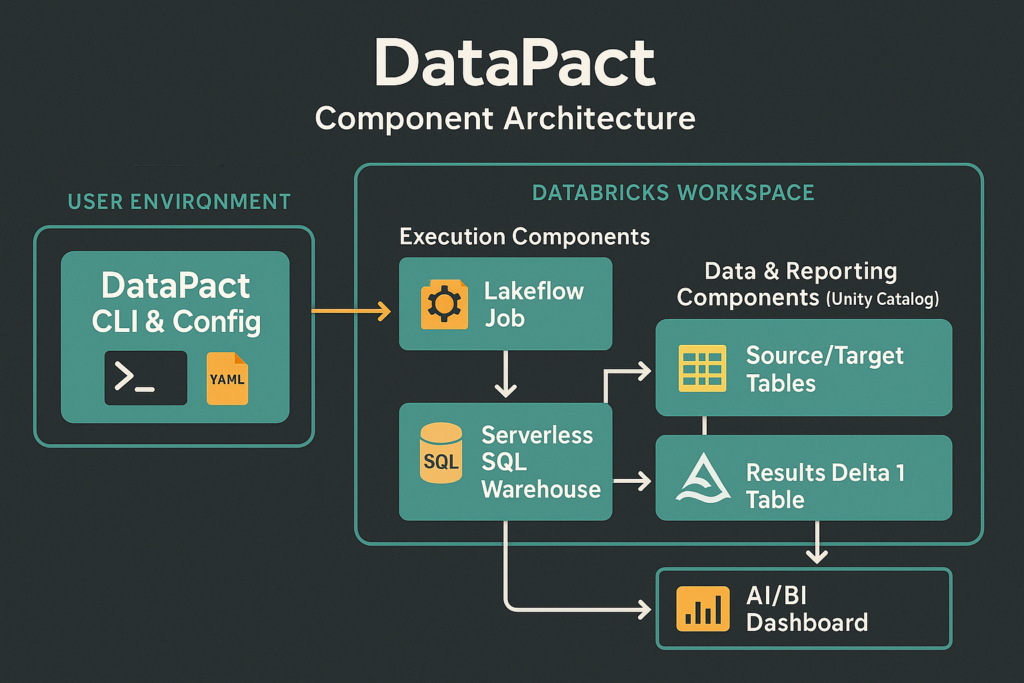
The idea behind the tests that DataPact performs is to compare a source and a target, i.e., tables. This may be a source table that was migrated to a target Databricks table that you want to ensure parity on, or the same version of the table in different environments, such as a QA table you want to promote to production, but only if the logic to build it creates the exact same version of the table in the development environment first.
DataPact has many different built-in tests for equality, such as row hash checks for row equality, count checks, null checks, uniqueness checks, etc. You can also create your own custom SQL tests that will run on the source/target to compare for equality.
In reality, especially during migrations, there won’t be an exact match between the source table and target table, especially if the source and target systems have different refresh cadences. This is why DataPact was built with a threshold feature that allows you to give an inequality tolerance that allows tests to pass if the difference is within the accepted threshold. For instance, if you don’t expect an exact count match, maybe you give a 5% tolerance to the count check, only failing if the counts differ by more than that 5%.
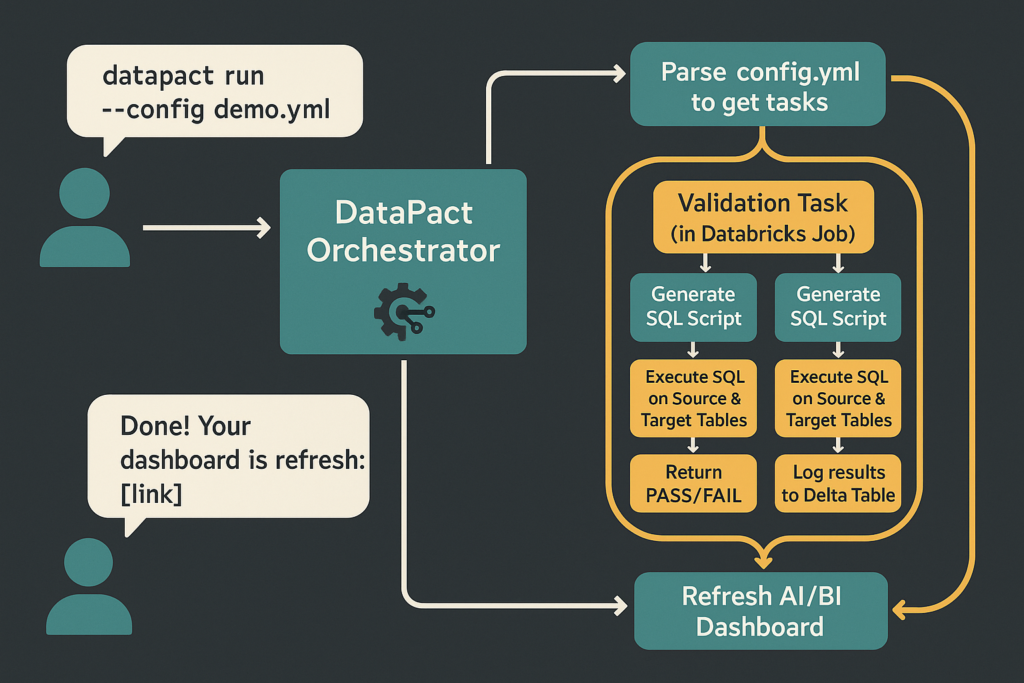
For these tests, you don’t have to write any code yourself. You define the sources and targets and which operational combinations you want performed on them in your config file, then DataPact figures out how to create and run the code for you. Once the tests are run, it will create a dashboard and tables for you to observe the results.
Using DataPact
To actually use DataPact, the only manual step is to create your config file that defines what tests you want to run and on what. This is a simple YAML file, with this structure:
Python:
# my_validations.yml
# A sample configuration for validating your own data with DataPact.

validations:
  # This task validates a dimension table.
  - task_key: "validate_dim_customers"
    source_catalog: "source_db_catalog"
    source_schema: "sales"
    source_table: "customers"
    target_catalog: "main"
    target_schema: "gold_layer"
    target_table: "dim_customers"
    primary_keys: ["customer_id"]
    count_tolerance: 0.0
    pk_row_hash_check: true
    pk_hash_tolerance: 0.01 # Allow for 1% of rows to have hash mismatches.
    agg_validations:
      - column: "lifetime_value"
        validations:
          - { agg: "sum", tolerance: 0.005 } # Tolerate a 0.5% difference in total lifetime value.
    custom_sql_tests:
      - name: "Status Distribution"
        description: "Ensure the source and target have identical status counts"
        sql: |
          SELECT status, COUNT(*) AS record_count
          FROM {{ table_fqn }}
          GROUP BY status

  # This task validates a large fact table where only critical columns are hashed.
  - task_key: "validate_fact_orders"
    source_catalog: "source_db_catalog"
    source_schema: "sales"
    source_table: "orders"
    target_catalog: "main"
    target_schema: "gold_layer"
    target_table: "fact_orders"
    primary_keys: ["order_id"]
    # Only validate the latest 30 days during daily runs to cut costs
    filter: |
      order_date >= date_sub(current_date(), 30)
    count_tolerance: 0.001 # Tolerate a 0.1% difference in row count.
    pk_row_hash_check: true
    pk_hash_tolerance: 0.0
    hash_columns: ["order_id", "customer_id", "order_date", "total_amount"] # Hash only key columns for performance.
From there, you run a datapact run CLI command pointing to this file (either locally or it can be run in a Databricks notebook), and DataPact takes care of the rest. It will then create a Databricks Job to orchestrate all the tasks (each task being an individual source/target validation grouping from the YAML config), run each task (which is executing each unique SQL generated by the validation’s test combinations in the config file), aggregates the results, creates tables, views, and dashboards based off of the results, and lastly creates the scaffolding for a Genie room for natural language questions about your data quality (there currently is no Genie room creation API, so DataPact creates the datasets and instructions to quickly create the room in the UI).
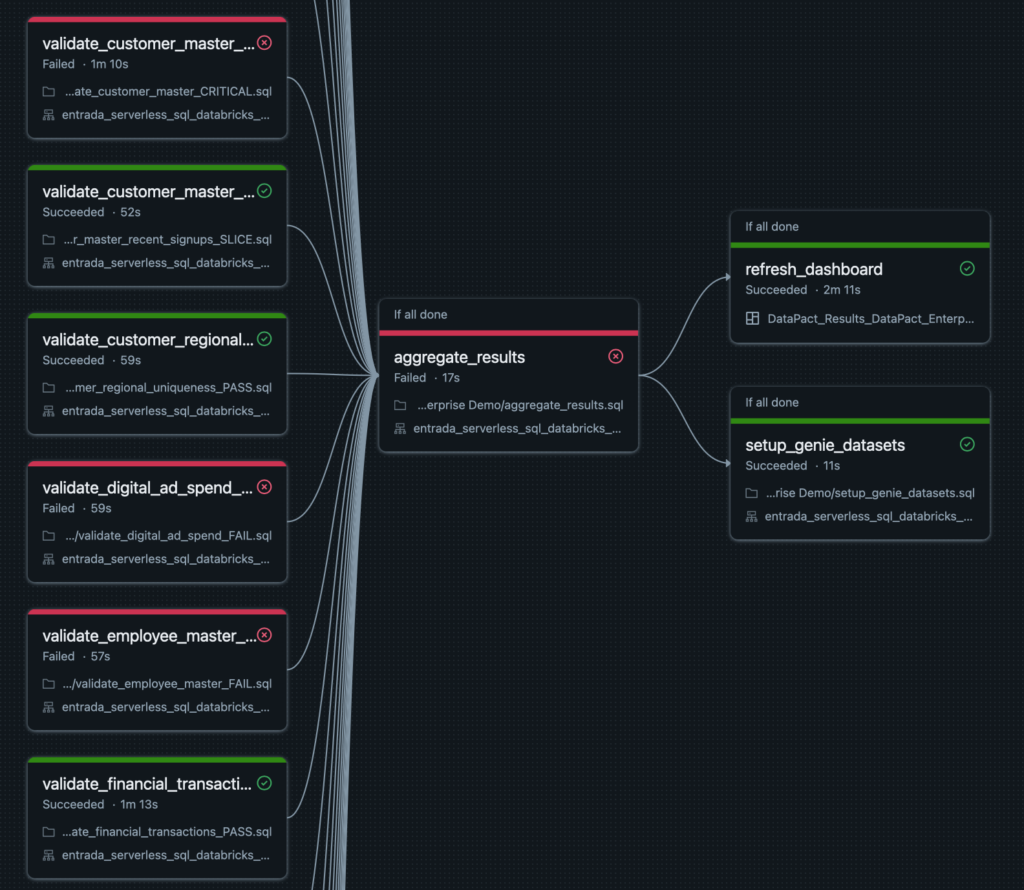
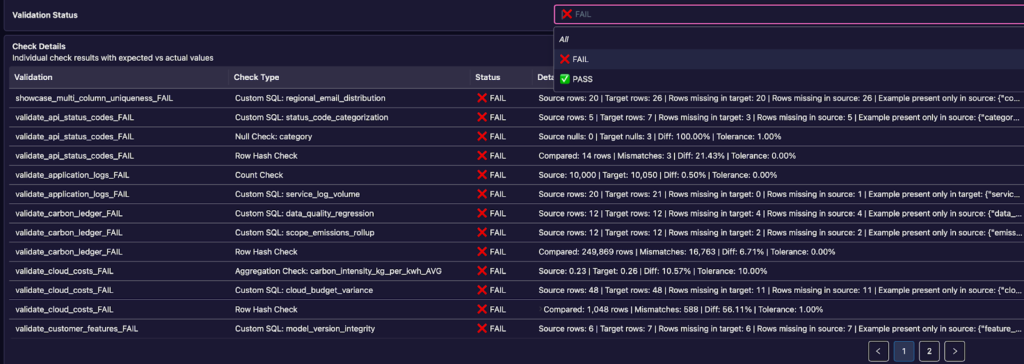
As you can see, DataPact can scale indefinitely, creating new tasks for each new validation you add to the config. Since it’s run on Databricks, the Databricks engine itself will manage the infrastructure and scaling of how the code is executed, all on a Databricks SQL warehouse (ideally Serverless). Once the run completes, you have a polished data quality dashboard to review the results:
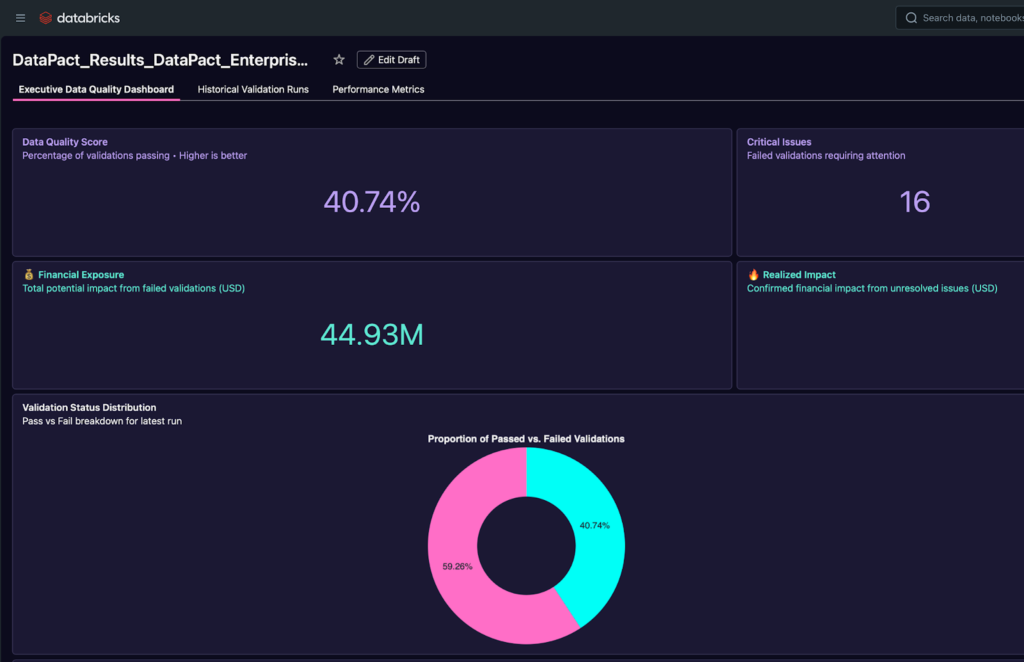
The visualizations range from a high level overview of your entire data quality estate to finer grained metrics on individual test results. There are multiple pages, one for the current data quality metrics, one for historical performance, and one for metrics about the DataPact runs themselves (so you can track cost and runtime, and the like).
Conclusion
DataPact solves many previously unsolved data quality struggles in the world of big data, such as scale, historical visibility, and velocity. This tool can be embedded easily into existing workloads and has a low barrier to entry for adoption. Reach out to your Entrada rep today for more information or a curated demo to see how DataPact can help solve your data quality needs.