Data Engineering
  Data Strategy + Governance
  Data Migrations
  Concierge + Support
  Artificial Intelligence
  Training + Enablement
  Data Analytics + Insights
  Financial Services
  Communications, Media + Entertainment
  Healthcare + Life Sciences
  Technology + Digital Natives
  Manufacturing + Automotive
  Public Sector
  Retail + Consumer Goods
  Race to the Lakehouse
  AI + Data Maturity Assessment
  Unity Catalog
  Rapid GenAI
  Modern Data Connectivity
  Gatehouse Security
  Health Check
  Sample Use Case Library
  Blog
Blog  Events
  About Us
  Careers
  Founding Team

When Databricks released Databricks Apps, Lakebase (managed Postgres), and Unity Catalog, Entrada saw an opportunity to change the paradigm. We needed much more than to just tag columns in UC, such as to build a full featured, hierarchical Business Glossary that rivals IKC in functionality but lives inside the Data Intelligence Platform, and even addresses some of its limitations.
This is the story of how we at Entrada built a custom Databricks Business Glossary – a custom application that merges the user-friendly experience of a traditional catalog with the raw power of Unity Catalog, effectively retiring legacy technical debt while supercharging data governance.
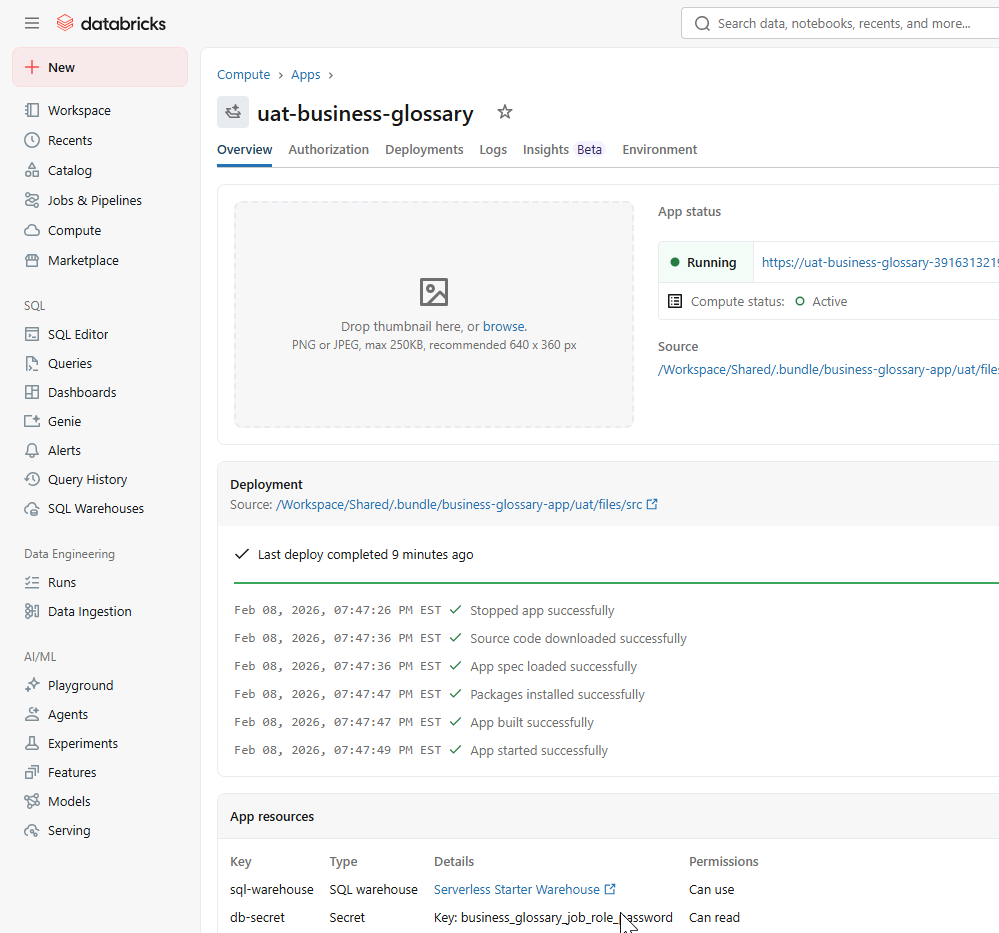
Deploying the custom Databricks App interface. This serverless frontend provides a secure, SSO-authenticated portal for stewards to manage the hierarchical Business Glossary.
The Gap: IBM Knowledge Catalog vs. Unity Catalog
To understand what we built, we must first understand the gap we bridged.
IBM Knowledge Catalog (IKC) is excellent at defining hierarchical taxonomy. It handles “Categories,” “Secondary Categories,” “Stewards,” and complex relationships (e.g. “Part of,” “Synonym”). However, syncing these definitions to the physical tables in your lakehouse is often a fragile, ETL-heavy process.
Databricks Unity Catalog is the best in the world at physical metadata management (Lineage, Schemas, Tables). However, out of the box, it is flat. You can add comments and tags to columns, but it lacks the UI for a non-technical data steward to manage a complex, multi-level domain hierarchy or define reference data sets without writing SQL.
Our Solution: We built a custom Databricks App that provides the rich, hierarchical UI of IKC but uses Unity Catalog and Lakebase as the engine. It creates a “Single Pane of Glass” where business definition meets physical data.
For those uninitiated with IKC, here are a few screenshots of that product so we can compare them to what we built at Entrada in Databricks (and keep in mind that we are comparing an enterprise-grade product with something we built in a few weeks with two primary developers):
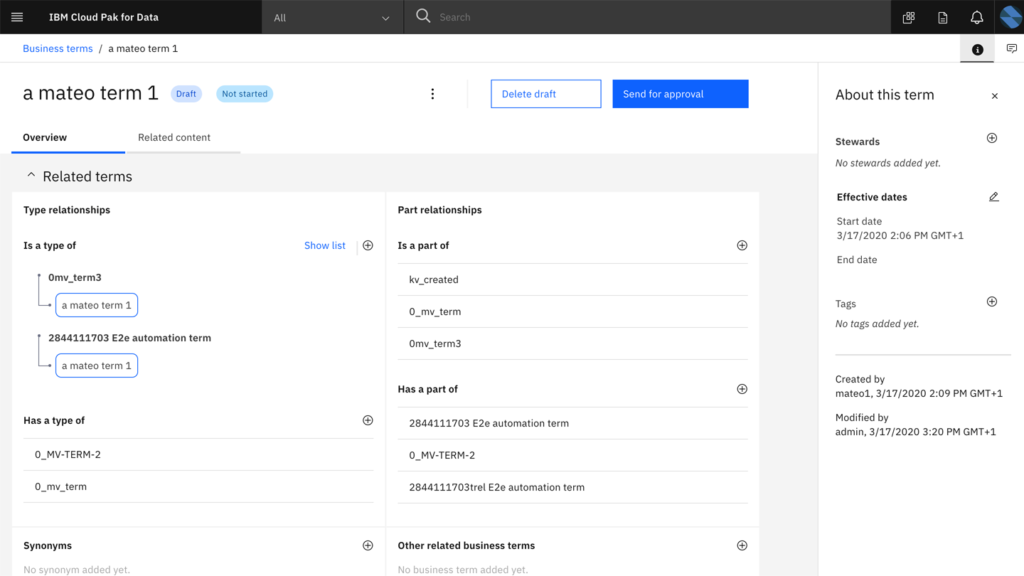
Visualizing the benchmark: IBM Knowledge Catalog (IKC) handles complex hierarchical taxonomy but remains siloed from the physical data layer.
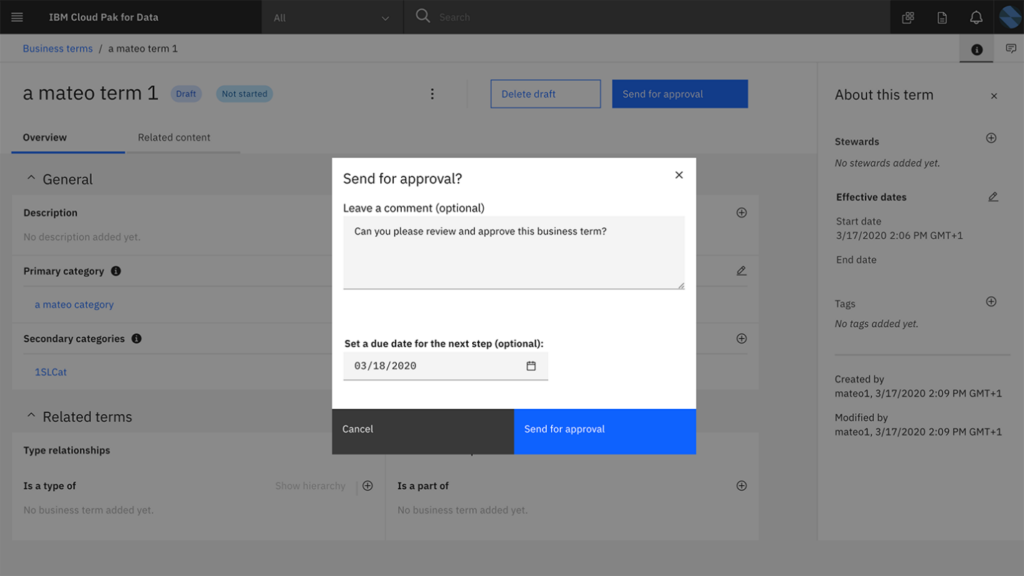
Legacy governance in action: The approval workflow for business terms in IBM Knowledge Catalog, requiring manual intervention and comments.
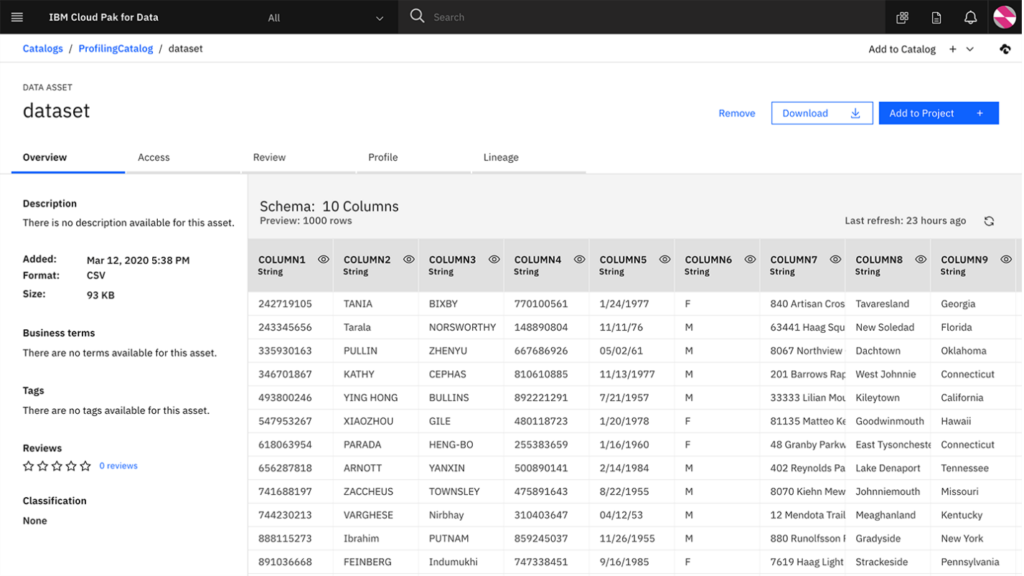
Physical data management in IBM Knowledge Catalog. While providing detailed schema previews and profiling, this view is often siloed from the high-level business definitions managed by stewards.
Compare these to the screenshots in the below sections from our App.
The Architecture: A Full-Stack Data App
We leveraged the full Databricks ecosystem to build a robust, three-tier application.
1. The Frontend: Dash on Databricks Apps
We chose Plotly Dash for the frontend because of its ability to handle complex data visualizations and interactivity within a Python ecosystem. Hosted on Databricks Apps, the frontend is serverless, secure, and automatically authenticated via Databricks SSO.
- Domain Hierarchy Sidebar: Just like IKC, we built a recursive tree view (
domain_hierarchy.py) that allows users to drill down from “Global Domains” to specific “Sub-domains.” - Term Grid: A high performance AG Grid (
term_grid.py) allows stewards to filter, sort, and edit thousands of terms instantly. - Graph Visualization: Using
dash-cytoscape, we built a lineage view (graph_view.py) that visualizes the relationship between a Business Term, its Stewards, and the physical Unity Catalog Columns it is linked to.
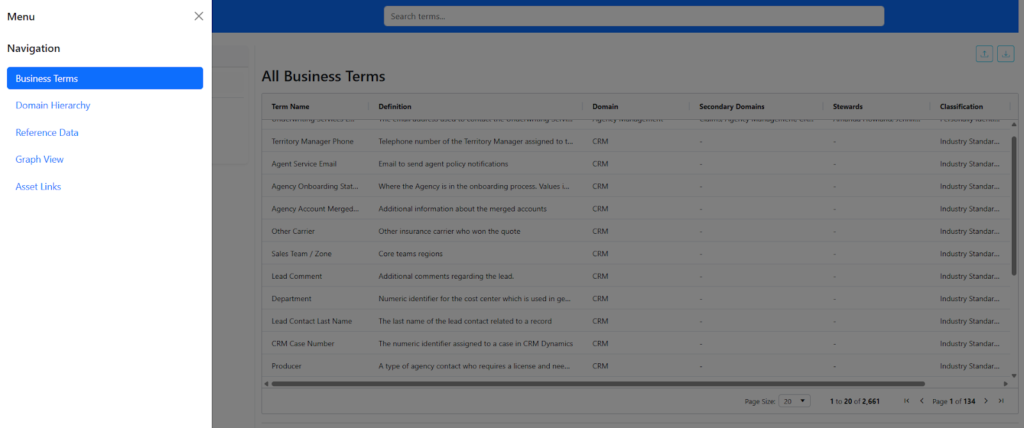
The Single Pane of Glass in action: A high-performance AG Grid within the Databricks App that allows stewards to search, filter, and manage thousands of Business Terms alongside their definitions and domains.
2. The Control Plane: Lakebase (PostgreSQL)
While Unity Catalog stores the physical metadata, we needed a place to store the semantic relationships, which is the ‘tissue’ that connects definitions. We utilized Databricks Lakebase, a fully managed Postgres instance for these transactional workloads.
We designed a normalized relational schema to handle the complexity that flat tags cannot:
- glossary_domains: Stores the recursive parent-child hierarchy.
- glossary_terms: The core definitions, tied to domains.
- glossary_term_relations: A polymorphic table handling term-to-term, term-to-reference-set, and term-to-value relationships.
- link_states: A sophisticated state machine that tracks the synchronization status between our glossary and the physical columns in Unity Catalog.
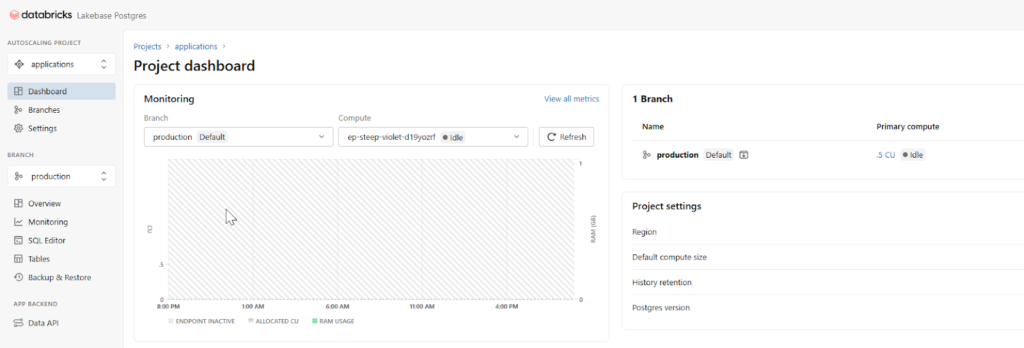
The Control Plane: Monitoring the Lakebase (managed Postgres) instance, which stores the complex semantic relationships and hierarchical “tissue” that connects business definitions.
3. The Integration Layer: Unity Catalog & System Tables
This is where the magic happens. We wrote an AssetLinksExecutor that acts as the bridge. When a Steward links a Business Term (e.g. “Adjusted Gross Revenue”) to a physical column (finance.sales.revenue_adj), the app doesn’t just store that link; it pushes the definition back to Unity Catalog via ALTER COLUMN COMMENT commands.
Key Technical Features
The “Asset Linker” Engine
One of the hardest challenges in governance is keeping the glossary in sync with the database. We built a robust engine (asset_links_executor.py) that performs a “State Diff.”
When a steward updates a definition in the App:
- The app identifies all physical columns linked to that term.
- It calculates a “Diff” (Add, Update, Delete).
- It executes
COMMENT ON COLUMNstatements against Unity Catalog to ensure that a Data Analyst querying the table via SQL sees the exact same definition as the Steward in the App. - It logs the synchronization state, handling schema drift (e.g. if a physical column is dropped, the link is marked INVALID rather than crashing the app).
IKC Parity + Migration
To replace IKC, we had to support its data format. We built a custom parser (ikc.py) that handles the complex, multi-row export format of IBM Knowledge Catalog.
- Recursive Category Parsing: It reads Category >> SubCategory >> Leaf strings and auto generates the domain IDs in Lakebase.
- Stewardship Mapping: It resolves email addresses from IKC exports to Databricks Principals.
- Reference Data: We built a dedicated module to manage Reference Data Sets (e.g. “State Codes,” “Industry Classifications”) and link them to terms, a feature often missing in standard catalogs.
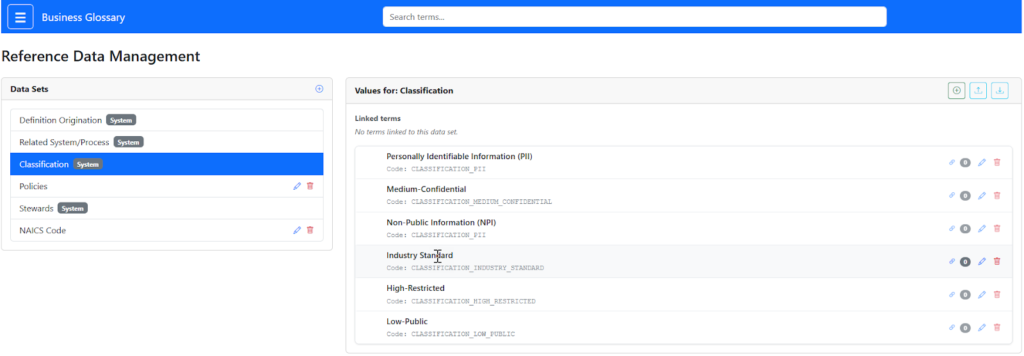
Centralizing governance with the Reference Data Management module, allowing stewards to define and link standardized data sets like classifications directly to business terms.
Interactive Graph Lineage
We wanted to visualize the impact of a term. Using graph_builder.py, we construct a network graph dynamically.
- Nodes: Terms, Reference Values, and Physical Assets (Tables/Columns).
- Edges: Relationships (e.g. “Term X classifies Column Y”).
This allows a user to click a term and instantly see every physical table in the Lakehouse that relies on that definition.
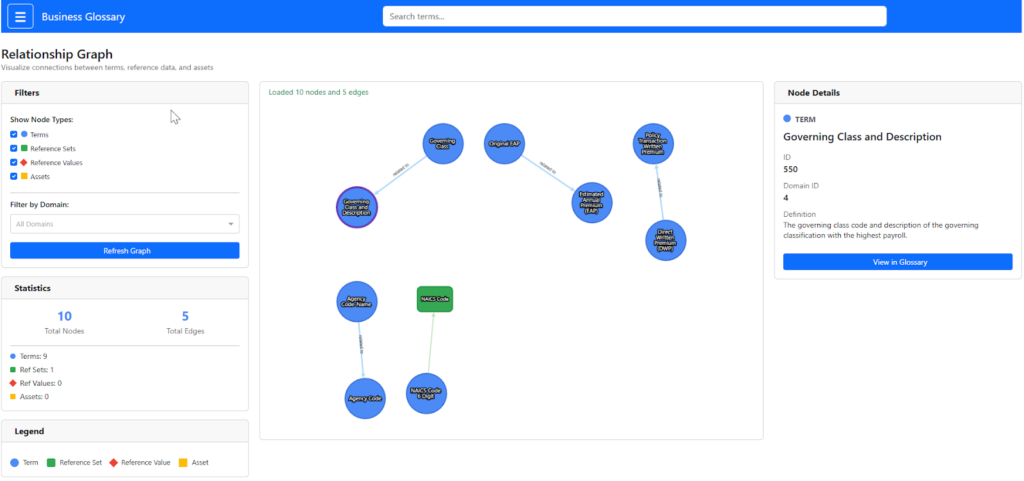
Visualizing the semantic impact: The Relationship Graph uses
dash-cytoscape to map connections between business terms, reference values, and physical Unity Catalog assets.Deployment: Databricks Asset Bundles (DABs)
We used Databricks Asset Bundles to professionalize the SDLC.
- Configuration:
databricks.ymldefines targets forlab, uat,andprod. - Isolation: Each environment gets its own Schema and Lakebase connection string.
- Automation: We included a specialized
init_schemajob that detects the schema version and applies SQL migration scripts (00.config.sqlto09.term_stewards.sql) automatically upon deployment.
Why This Wins
By building this in Databricks, we achieved three things that IKC never could:
- Immediacy: The moment a definition is updated in the Glossary, it is visible to a Data Scientist in a Notebook or a SQL Analyst in the Query Editor. There is no sync lag.
- TCO Reduction: We eliminated the licensing cost of a standalone governance tool and the operational overhead of maintaining a separate server.
- Extensibility: Because the backend is standard SQL and the frontend is Python, we can add features (like GenAI-based definition suggestions) in an afternoon, not a 6 month vendor roadmap cycle.
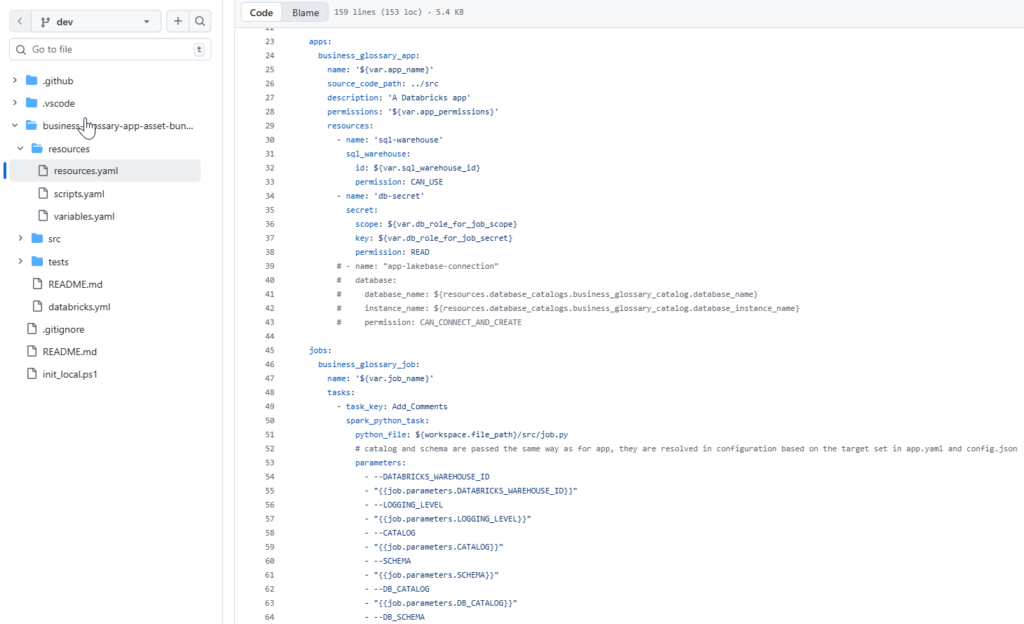
Professionalizing the SDLC using Databricks Asset Bundles (DABs) to automate Business Glossary deployments and resource isolation
Conclusion
This project proves that Databricks Apps can be extended well beyond simple dashboards. It is a capable platform for building complex, enterprise grade data management software. By combining the semantic richness of a dedicated glossary with the physical reality of Unity Catalog, instead of replacing IKC, we were able to build something better. A glossary that actually lives where the data is, and all of the added abilities that go along with that concept.
Ready to retire your legacy technical debt and supercharge your data governance? Contact the Entrada Team today to learn how we can help you build a native, bonafide Business Glossary directly within your Databricks environment.