Data Engineering
  Data Strategy + Governance
  Data Migrations
  Concierge + Support
  Artificial Intelligence
  Training + Enablement
  Data Analytics + Insights
  Financial Services
  Communications, Media + Entertainment
  Healthcare + Life Sciences
  Technology + Digital Natives
  Manufacturing + Automotive
  Public Sector
  Retail + Consumer Goods
  Race to the Lakehouse
  AI + Data Maturity Assessment
  Unity Catalog
  Rapid GenAI
  Modern Data Connectivity
  Gatehouse Security
  Health Check
  Sample Use Case Library
  Blog
Blog  Events
  About Us
  Careers
  Founding Team

Most enterprise migrations start strong.
There is urgency. There is clarity of purpose. The team focuses on getting data mapped, transformed, and landed correctly. Early stages usually run in a single environment, without the need to worry about promotion, release cycles, or operational sustainability. At that moment, the goal is simple: make it work.
Execution model?
Delivery pattern?
Repeatability?
Those questions rarely feel urgent in the beginning.
Our enterprise conversion followed the same path. We were migrating data from legacy HCM and CRM systems into Dynamics 365. The transformation logic grew steadily. Notebooks were added one by one. Each entity got its own implementation. The pipeline expanded naturally.
Our orchestration pattern was simple: chain ADF Notebook Activities in execution sequence and let ADF execute them one by one. Each invocation spun up compute, ran the notebook in isolation, and terminated the cluster at the end.
Sounds easy. And at first, it was.
In early stages, notebooks lived comfortably under feature branches, executed on interactive compute. Parquet files were exported to ADLS and passed downstream, waiting to be loaded into Dynamics. There was no pressure to think about release mechanics or execution boundaries. Everything ran in a controlled, development-oriented rhythm.
But that foundation – built for speed and simplicity – quietly defined our future constraints.
When the time came to bring everything together, plan structured releases, stabilize environments, and measure full execution time, the weaknesses of that early design surfaced. What worked smoothly in isolation became fragile and expensive at scale.
The trouble wasn’t in the transformation logic.
It was in how we chose to execute it.
The Cost Breakdown That Forced a Rethink
The first structured release cycle hit harder than we expected. What worked comfortably during development did not translate into smooth production execution once everything was chained together. Release windows stretched, downstream consumers waited longer than planned, and what initially looked like a simple orchestration pattern started revealing hidden inefficiencies.
As part of a post-mortem, we analyzed the execution characteristics of the full conversion workflow. The goal was to quantify the actual compute cost and runtime behavior of the pipeline before projecting production operating costs.
The workflow covered:
- 32 business entities;
- 54 Databricks notebooks;
- approximately 3.8 hours (~228 minutes) of end-to-end execution time.
The pipeline uses a Databricks job cluster with Azure VM D16ds v5 instances (1 driver + 1 worker, 2 nodes total) under the Premium Tier, Pay-as-You-Go pricing model.
Provisioning a Databricks cluster involves several initialization steps:
- Azure VM allocation
- Databricks runtime download and initialization
- Spark driver and executor startup
- library installation and environment setup
- cluster configuration validation (policy enforcement)
Across multiple executions we observed an average cluster startup time of ~2.5 minutes when using the “New Cluster” option in ADF Databricks Linked Service.
Total Startup Time = Notebook Count × Average Startup Time
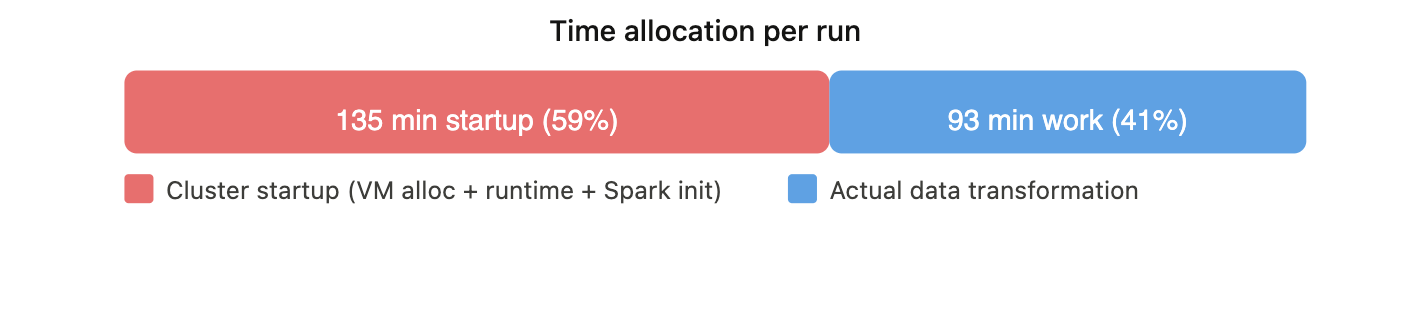
Total Startup Time = 54 × 2.5 min ≈ 135 minutes
Startup Percentage = (Total Startup Time / Total Workflow Time) × 100
Startup Percentage = (135 / 228) × 100 ≈ 59%
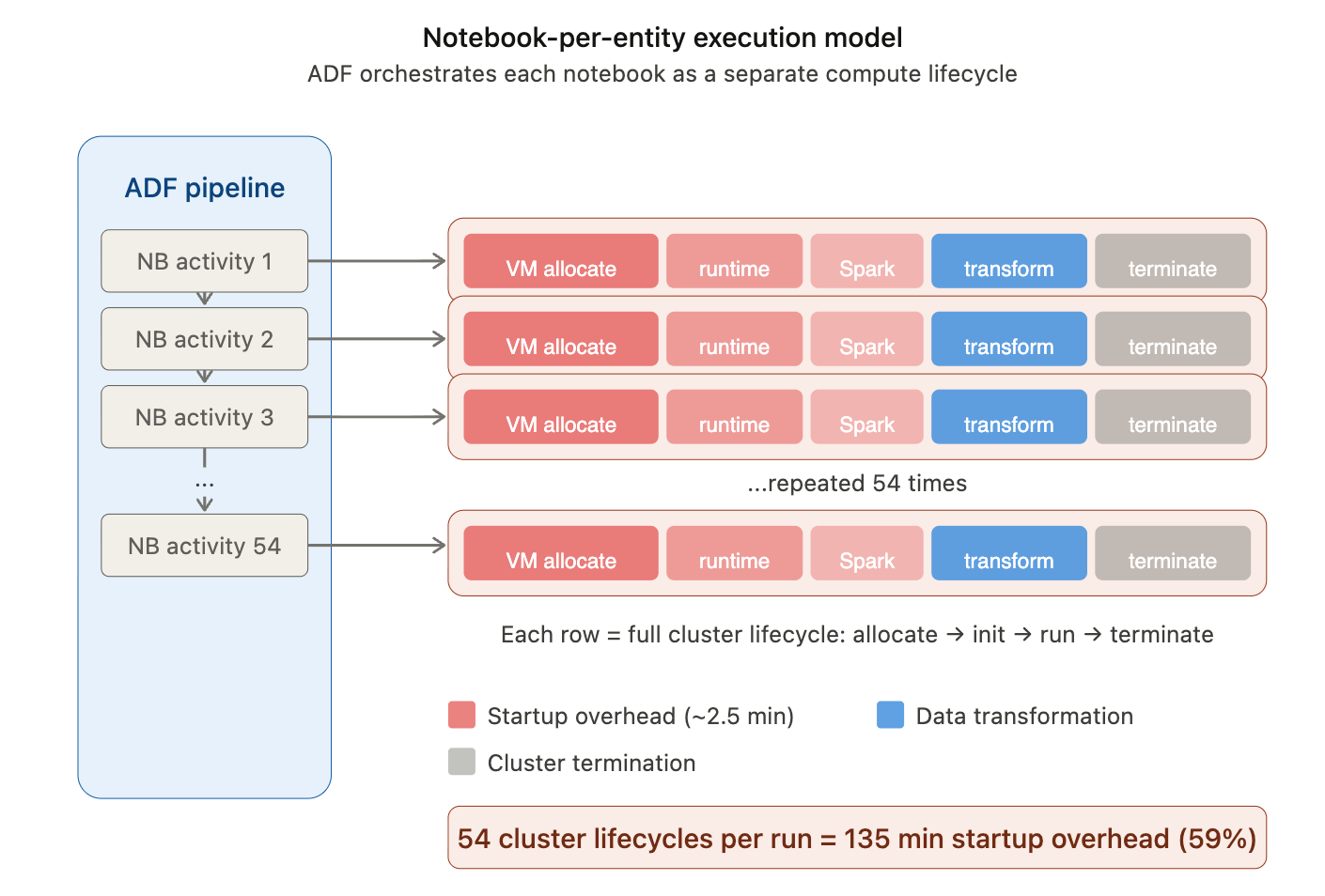
This means that nearly 60% of the total execution time was spent on cluster provisioning and initialization rather than on data processing.
What about VM and DBU costs? Rates for Azure Databricks D16ds v5 VM are following.
| Metric | All-Purpose Compute | Jobs Compute |
| DBUs per Node | 4.00 | 4.00 |
| DBU Price | $2.20/hour | $1.20/hour |
| VM Price | $0.904/hour | $0.904/hour |
Total Hourly Cost =
(Azure VM Rate × Number of Nodes)
+
(DBU Price × DBUs per Node × Number of Nodes)
Total Hourly Cost = (0.904 × 2) + (1.20 × 4 × 2) = $11.408 / hr
Total Execution Cost = Total Hourly Cost × (Pipeline Avg Execution Time / 60)
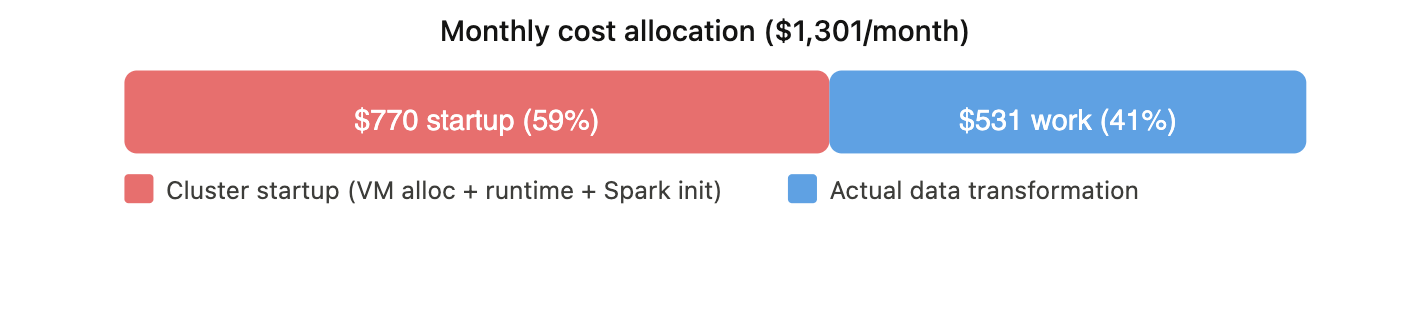
Total Execution Cost = 11.408 × (228 / 60) = $43.35
Monthly batch projection (1 run/day, 30 days/month)
| Metric | Total | Startup Overhead Only |
| Hours/month | 114 hr (3.8 × 30) | 67.5 hr (2.25 × 30) |
| Cost/month | $1,300.51 (11.408 × 3.8 × 30) | $770.04 (11.408 × 2.25 × 30) |
| % of total | 100% | ~59% |
A note on Azure VM billing: since June 2025, Azure charges VMs per second with a 5-minute minimum per lifecycle. If a cluster runs for 1 minute and terminates, you still pay for 5 minutes of VM time. DBU billing has no such floor, it’s purely per second. In our pipeline, many lightweight notebooks complete in under 5 minutes, meaning each cluster lifecycle incurs the full 5-minute VM charge regardless of actual work done. Pools help reduce execution time for these notebooks, but the VM cost floor limits the savings – a notebook finishing in 1m 27s with a pool still pays for 5 minutes of VM time. The real cost lever is reducing the number of cluster lifecycles, not just their duration. This is why the structural redesign (entity-centric Jobs) compounds with pools: fewer lifecycles means fewer 5-minute VM minimums.
So, we weren’t dealing with a transformation performance problem. We were dealing with an execution model problem.
Solution: Tactical Fix, Then Structural Redesign
Once the team internalized the numbers, the question wasn’t whether to act – it was how fast and how deep.
Tactical Fix: Databricks Instance Pools.
The immediate goal was to reduce cluster startup latency without touching the orchestration model. Databricks Instance Pools allow us to keep a set of pre-warmed, idle-ready VMs available so that cluster provisioning skips the two slowest steps – Azure VM allocation and runtime download. This wouldn’t change how many times clusters spin up, but it would make each spin-up significantly cheaper in time. It was a same-week fix – low risk, no architectural change, measurable impact.
Structural Redesign: Entity-Centric Orchestration with Databricks Asset Bundles.
The deeper fix was to change the execution boundary itself. Instead of ADF triggering 54 individual notebook activities – each with its own cluster lifecycle – we restructured around Databricks Jobs, one per business entity, with tasks sharing compute within the job. Orchestrated through Databricks Asset Bundles (DABs), this gave us version-controlled, repeatable job definitions with intentional compute allocation. This was the structural redesign: fewer clusters, longer-lived, right-sized per entity.
The tactical fix bought us time.
The strategic fix changed the cost model and shifted delivery mindset.
Both were necessary and in that order.
Tactical Fix: Databricks Instance Pools
The question was simple: can we reduce cluster startup time without changing anything about how the pipeline is orchestrated? The answer was Instance Pools.
What an Instance Pool actually does
When a Databricks cluster starts without a pool, the provisioning sequence goes through several steps: Azure VM allocation, Databricks runtime download, Spark initialization, library installation, and policy enforcement. Of these, the two slowest steps are VM allocation and runtime download.
An Instance Pool is a managed cache of pre-allocated, idle-ready VMs. When a cluster attached to a pool requests compute, it skips VM allocation entirely and pulls from the warm cache. If the pool is also configured with a preloaded Databricks Runtime (in our case, 16.4 LTS with Spark 3.5.2), the runtime is already loaded on idle instances – eliminating both the VM wait and the runtime download. What remains is only Spark context initialization and library setup, which are significantly faster.
Databricks does not charge DBUs for idle instances sitting in the pool. You do, however, pay Azure infrastructure costs for those VMs as long as they exist. That tradeoff – trading some idle VM cost for dramatically faster cluster starts – is the entire value proposition.
One additional benefit worth noting: pool tagging. Tags applied to pools propagate to the underlying Azure resources and to Databricks billing reports. For enterprise migrations where cost attribution matters, this provides a clean way to associate compute spend with specific workloads or cost centers without extra instrumentation.
What we tested
We ran a controlled comparison across a sample of entity notebooks – same data, same cluster configuration – with and without an Instance Pool backing the job cluster. We tested two pool configurations to understand the cost tradeoff.
- Option A: Min idle: 6, Idle auto-termination: 10 min.
With 6 idle VMs pre-allocated (enough for 3 clusters × 2 nodes), every notebook gets a warm start with preloaded runtime. In our tests, lightweight notebooks like kf_region dropped from 4m 41s to 1m 27s – a 69% reduction. Heavier notebooks like account saw smaller gains (~11%) because actual processing dominated their runtime.
The problem: those 6 VMs are billed by Azure whenever the pipeline isn’t running. At $0.904/hr per VM across ~655 idle hours/month (720 total hours minus ~65 hours of active execution), that adds $3,555/month in idle infrastructure cost – far exceeding the execution savings. - Option B: Min idle: 0, Idle auto-termination: 10–15 min.
With Min idle = 0, the pool holds no warm VMs when nothing is running. The first wave of clusters (roughly 3 parallel clusters, 6 VMs) still cold-starts from Azure. But once those notebooks finish and release their VMs back to the pool, subsequent notebooks reuse them within the idle termination window – getting warm-start speeds without any 24/7 idle cost. The preloaded runtime still helps here: when VMs return to the pool, the runtime stays cached, so reused instances skip both VM allocation and runtime download.
The tradeoff: the first wave pays the cold-start penalty (~2.5 min), adding roughly 11 extra minutes per run compared to the always-warm option. For a daily batch, that’s negligible.
Monthly projection (1 run/day, 30 days)
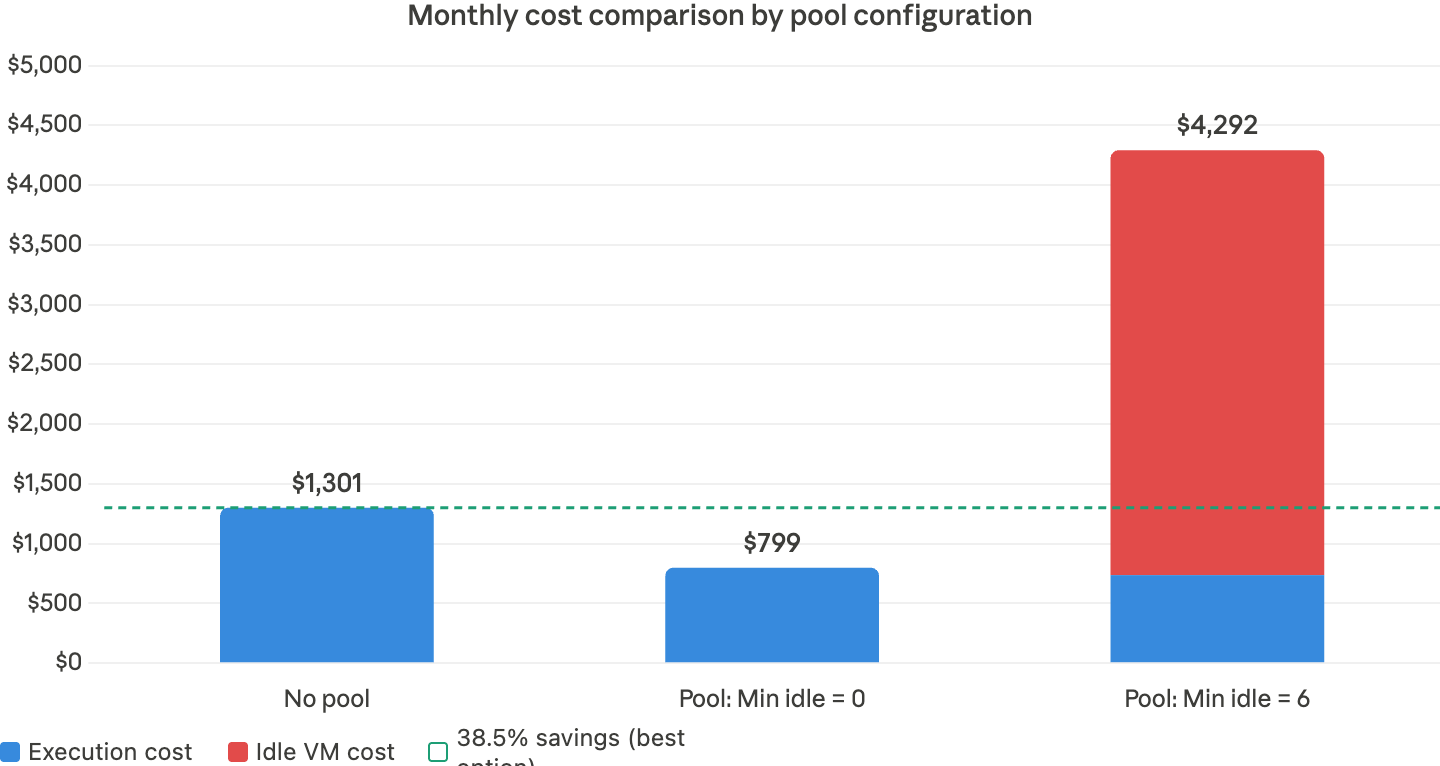
| Metric | No Pool | Pool: Min Idle=0 | Pool: Min Idle=6 (24/7) |
| Per-run time | 228 min | 140 min | 129 min |
| Per-run startup | 135 min | 47 min | 36 min |
| Startup % | 59% | 34% | 28% |
| Monthly total hours | 114 hr | 70 hr | 65 hr |
| Monthly execution cost | $1,301 | $799 | $737 |
| Monthly idle VM cost | $0 | $0 | $3,555 |
| Total monthly cost | $1,301 | $799 | $4,292 |
Acknowledged but not applied at this stage
Several additional optimization patterns exist that we intentionally deferred from the tactical fix. These are well-documented Databricks capabilities, and we plan to evaluate them as part of the structural redesign and ongoing cost optimization:
- Separate driver and worker pools. Databricks recommends using different pools for driver and worker nodes – particularly to enable spot instances for workers while keeping the driver on-demand for reliability. At our current scale (single instance type, 1-worker clusters), a single shared pool is sufficient. As entity complexity grows and multi-worker configurations become necessary, this becomes a meaningful cost optimization lever.
- Automated pool warm-up. Pool sizing can be scheduled via the Databricks Instance Pools REST API – scaling Min idle up before a pipeline run and back to 0 after. Databricks also documents a “starter job” pattern: a lightweight job scheduled minutes before the real pipeline to pre-warm pool instances. Neither approach was pursued here – the goal was to reduce startup latency without adding operational complexity. Both remain viable for future iterations.
What it didn’t solve
Instance Pools reduced the cost per startup – but they didn’t reduce the number of startups. We were still spinning up and tearing down a cluster for every single notebook invocation. 54 startups per run. The fundamental execution model was unchanged.
The pool bought us breathing room. It made the existing pattern tolerable enough to ship the first production releases. But we knew the real fix wasn’t about making each startup cheaper – it was about eliminating most of them entirely.
That required changing the execution boundary itself – which is what Phase Two addresses.
Key Takeaways – Tactical Fix
- Instance Pools with Min Idle = 0 cut startup overhead from 59% to 34% and monthly cost from $1,301 to $799 – a 38.5% reduction with zero idle cost.
- Per-run execution time dropped from 228 to 140 minutes, reclaiming ~88 minutes per run.
- Min Idle = 6 (always warm) delivered the fastest starts but added $3,555/month in idle VM cost – making it 3.3× more expensive than no pool at all.
- The tactical fix improved cost-per-startup but left the root cause untouched: 54 separate cluster lifecycle events per run. Startup still consumed a third of every execution.
The cost curve was better, but the architecture was unchanged. In the next section, we shift from notebook-level to entity-level orchestration – using Databricks Jobs and Asset Bundles – to eliminate the root cause.
Structural Redesign: Entity-Centric Orchestration with Databricks Asset Bundles
The tactical fix reduced time per startup. The structural redesign eliminates most startups entirely.
Why Databricks Asset Bundles (DABs)
Shifting from notebooks to Jobs creates a new requirement: how do you define, version, test, and promote job configurations across environments? DABs provide a declarative, version-controlled way to define Databricks resources – jobs, tasks, cluster configurations, and compute presets – as code. A bundle is the deployable unit: everything needed to provision and run a job in any target environment, with environment-specific overrides handled through configuration rather than manual changes.
For our migration, DABs solve the problems that the notebook-centric model couldn’t:
- Entity as a deployable unit. Each business entity becomes a self-contained bundle – job definition, task graph, compute configuration, and promotion history travel together. “What exactly is running in production for the Employee entity?” becomes an answerable question.
- Compute presets as code. Lightweight entities use minimal compute; heavy transactional entities use larger cluster profiles. Cost becomes proportional to workload by design.
- Pools + Jobs = compounded benefit. Pool-backed warm starts multiply with the startup count reduction from Jobs – each entity starts a cluster once instead of once per notebook.
- Development and QA isolation. In our environment, development and testing share the same workspace. Without isolation, running a dev notebook could overwrite tables or views that QA is actively validating. DABs solve this through resource isolation – each bundle deployment targets its own schema prefix and artifact namespace (e.g.,
dev_engineer1.employee_entity), so a developer can build and test entity transformations in complete isolation without interfering with QA validation runs. This gave us the confidence to run parallel workstreams in a shared environment. - CI/CD readiness. Deployments become repeatable, idempotent, and auditable. Environment promotion follows a governed path.
Target-state architecture
Instead of ADF triggering 54 individual Notebook Activities, each with its own cluster lifecycle, we restructure around Databricks Jobs – one per business entity. Within each job, tasks share a single cluster. The cluster starts once, runs all tasks, and terminates once. ADF’s role simplifies to triggering entity-level Jobs and monitoring completion.
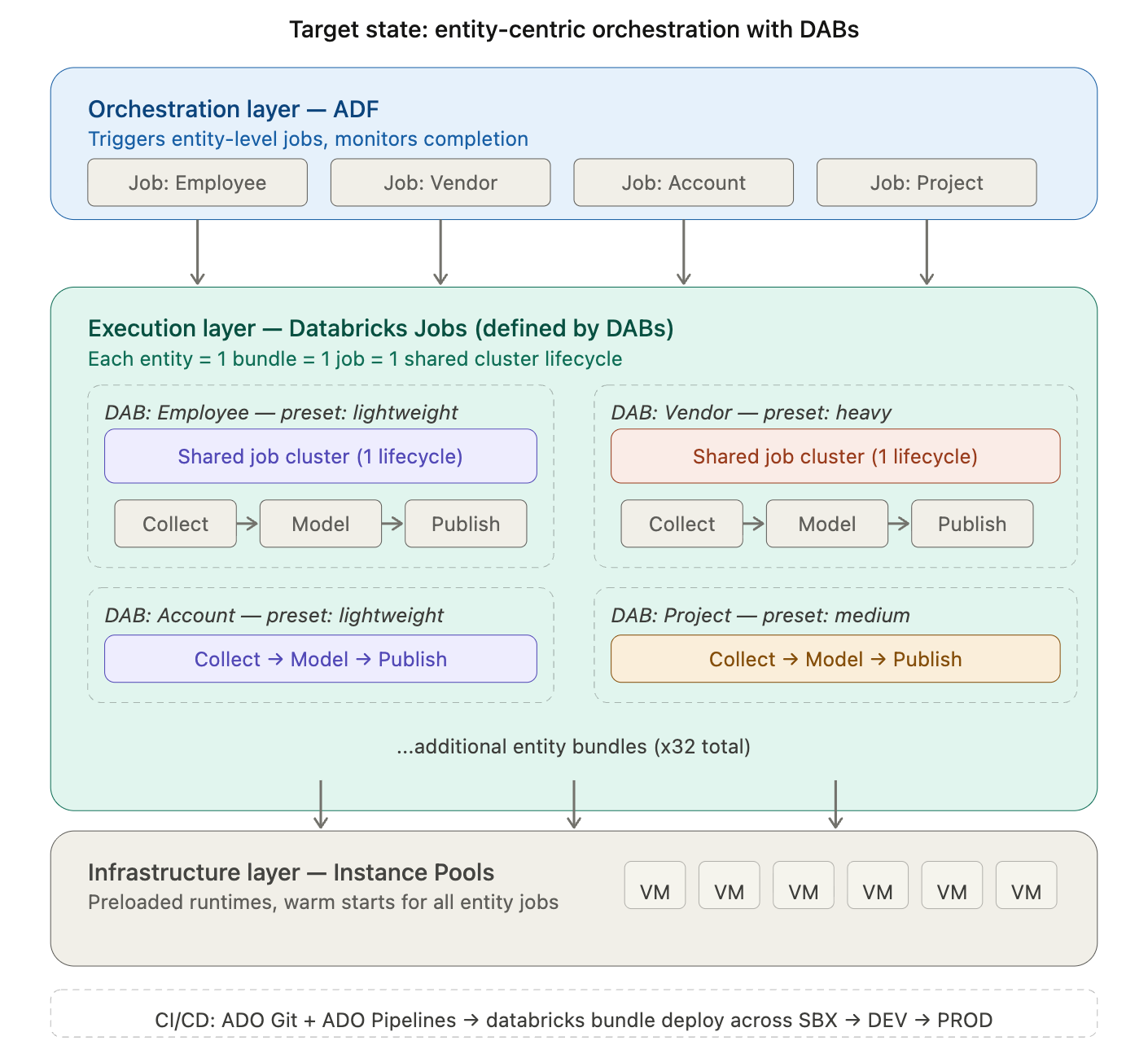
In the target state, ADF orchestrates at the entity level. Each entity is a Databricks Job defined and deployed through a DAB. Tasks within the job share a right-sized cluster. Pools provide warm VMs. The result: fewer cluster lifecycles, intentional compute allocation, and a promotion model that scales with the migration.
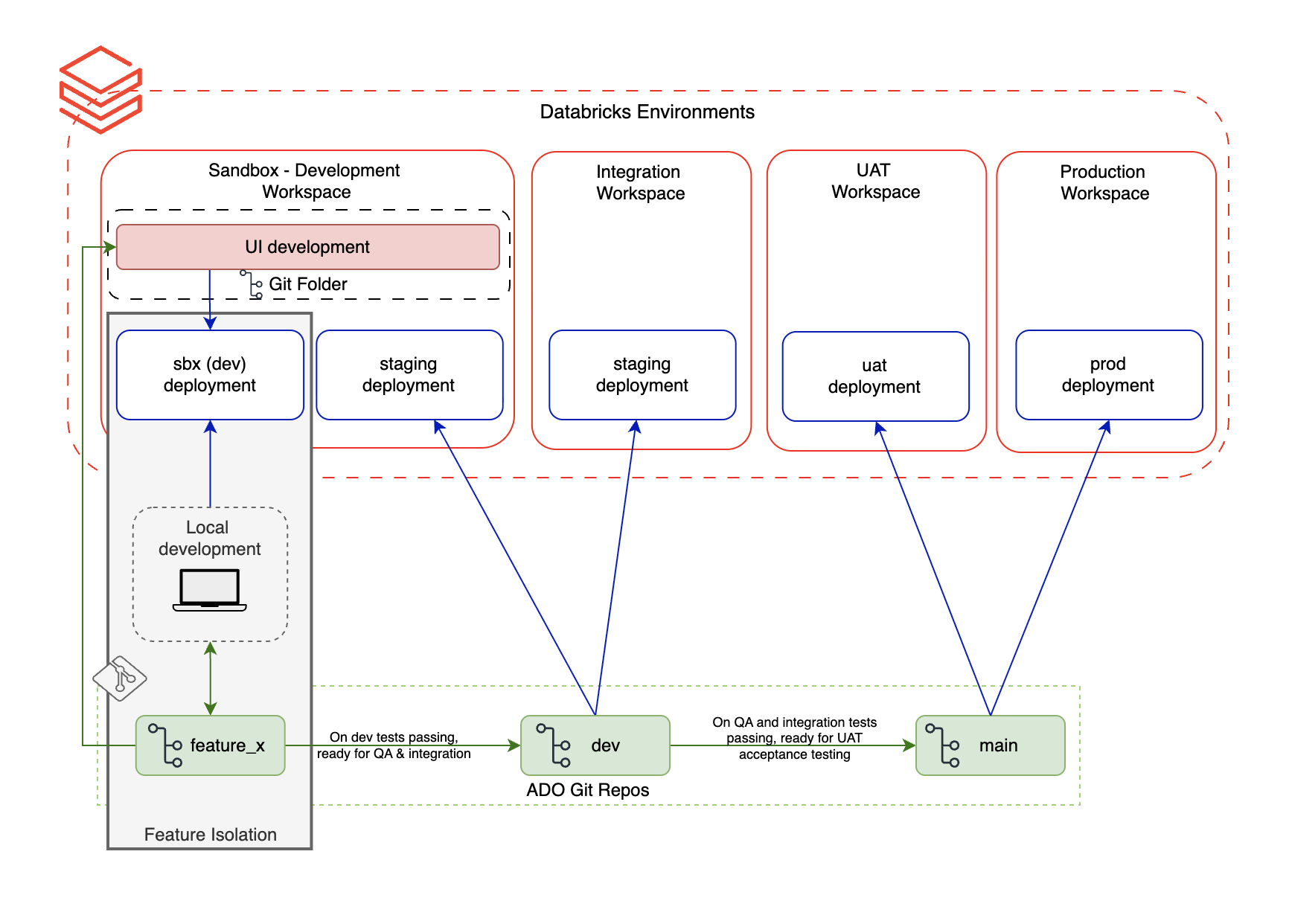
Bundles also integrate naturally with CI/CD pipelines. In our setup, entity bundles are stored in ADO Git repositories. Pull requests trigger an ADO CI pipeline that validates the bundle structure and runs tests. On merge, an ADO CD pipeline executes databricks bundle deploy to the target environment – SBX, DEV, or PROD – with environment-specific overrides applied automatically. Deployments are repeatable, idempotent, and auditable: every promotion is a versioned, traceable event rather than a manual coordination effort.
Early signals
The first 10 entities have been converted from ADF Notebook Activities to DAB-managed Jobs. Initial results confirm the direction:
- Cluster lifecycle count dropped from 18 to 8 (for the first 10 converted entities)
- 40–60% compute cost reduction for lightweight entities via right-sized presets
- Startup overhead below 5% (down from 59%)
- Deployment consistency improved immediately – the same bundle definition deploys identically across SBX, DEV, QA and UAT without manual reconfiguration.
Key Takeaways – Structural Redesign
- The root cause of the latency tax is the number of cluster lifecycles, not their individual duration. Pools reduce cost per startup; Jobs reduce startup count.
- DABs provide the missing layer: version-controlled, environment-aware job definitions that make entity-centric orchestration repeatable and promotable.
- Pools and Jobs compound – warm starts from pools multiply with fewer lifecycles from Jobs.
- The 5-minute Azure VM billing minimum makes lifecycle count reduction even more impactful than startup speed alone.
Closing
Execution model is not a DevOps detail. It is an architectural decision – and in enterprise migrations, it may be the most expensive decision you make without realizing it.
In our case, the shift from notebook-centric to entity-centric orchestration didn’t just reduce cost. It changed how we think about ownership, promotion, and delivery at scale. Cluster pools bought us time. Jobs and DABs changed the foundation.
The next article in this series shifts from execution model to delivery model: how treating each Dynamics and Workday conversion entity as a deployable data product – with explicit ownership, testing contracts, and governed promotion – changes the way teams deliver. It will cover DABs implementation patterns, compute preset design, CI/CD integration, and the full before/after comparison across the entity portfolio.
Ready to eliminate the 60% startup tax and architect a truly sustainable data platform? Contact Entrada today to start your structural redesign.