Data Engineering
  Data Strategy + Governance
  Data Migrations
  Concierge + Support
  Artificial Intelligence
  Training + Enablement
  Data Analytics + Insights
  Financial Services
  Communications, Media + Entertainment
  Healthcare + Life Sciences
  Technology + Digital Natives
  Manufacturing + Automotive
  Public Sector
  Retail + Consumer Goods
  Race to the Lakehouse
  AI + Data Maturity Assessment
  Unity Catalog
  Rapid GenAI
  Modern Data Connectivity
  Gatehouse Security
  Health Check
  Sample Use Case Library
  Blog
Blog  Events
  About Us
  Careers
  Founding Team

I get asked this in almost every architecture review now. A client has invested years in Power BI dashboards, has a Tableau Center of Excellence, and someone on the leadership team saw a Databricks AI/BI Genie demo at Data + AI Summit. The next question is predictable: do we still need the others?
It is the wrong question. The right one is what each tool is actually built to do, and where Genie fits without forcing you to throw working investments away. As someone who spends most weeks migrating clients onto the Databricks Data Intelligence Platform at Entrada, I have a strong opinion on this, and it is not the one Databricks sales is going to give you.
What AI/BI Genie actually is (and is not)
Genie is not a dashboarding tool. That distinction matters more than most teams realize before they buy into it.
AI/BI Genie went generally available on all clouds in 2025, and it lets users ask questions in natural language and get instant insights from data. A business user types “How is my sales pipeline trending versus last quarter?”, and Genie returns a text summary, a table, and a chart, along with an explanation of how it got there. Databricks
Under the hood, Genie is a compound AI agent. It uses multiple large language models and a system of specialized AI agents that handle various tasks typically associated with BI tools, such as query generation, visualization, summarization, and semantic understanding. That is the architectural piece most reviews skip. Genie is not a single model writing SQL. It is an orchestration of agents reading from a Knowledge Store that you, the data team, have to curate. Atlan
The heart of Genie is its knowledge store, a living semantic model that Genie’s AI system consults each time it answers a question. Authors can add knowledge directly to data assets, including column-level synonyms and sampled values, as well as table-level context such as primary or foreign key joins or certified metrics. Databricks
This is the part where I usually pause the demo and tell the client: this is not magic. It is governance work, repackaged.
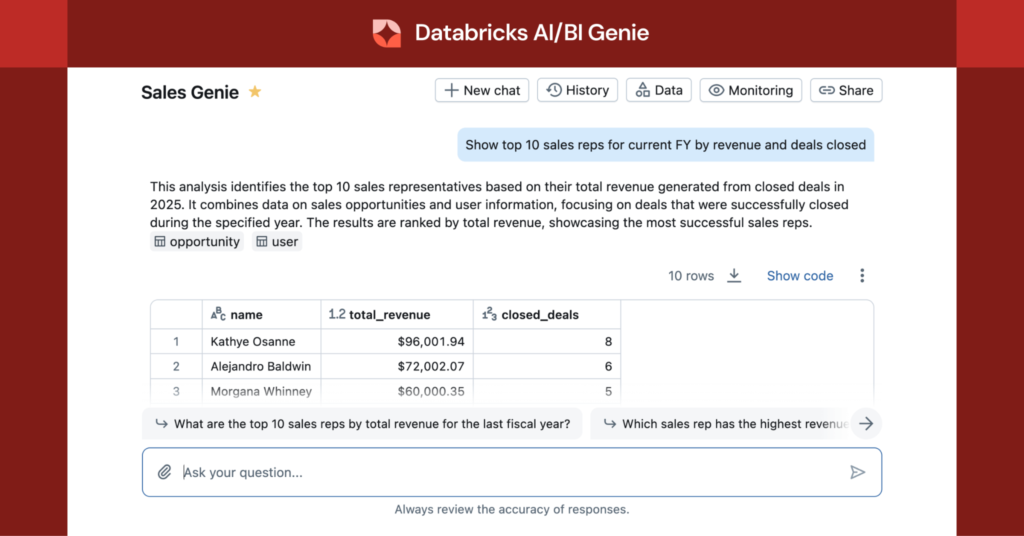
Source: Databricks Blog
Genie does not compete with Power BI or Tableau. It competes with the analyst sitting next to them.
Here is the framing that has saved my clients money. Power BI and Tableau exist to publish governed, visually polished, repeatable reports for repeatable questions. Your CFO needs the same five charts every Monday. That is a dashboard problem, and it has been solved for fifteen years.
Genie exists for the questions that are not on the dashboard. The follow-up. The “why did this region drop?” question that today sits in a Slack message to a data analyst, gets a response in three days, and produces a one-off SQL query nobody will ever read again.
That is the actual workload Genie eats. Not your Power BI semantic model. Your data analyst’s inbox.
I covered the Power BI integration story in detail in our earlier piece on Power BI Implementations, and the conclusion holds: Power BI on top of Databricks SQL Warehouses remains the right choice for production reporting. Direct Lake comes with its own costs. In order to use Direct Lake with Power BI, the data must be stored in OneLake. This means that to read that data back with Databricks or any other platform, organizations have to consume both Capacity Units and DBUs, essentially doubling their costs. Genie does not change that calculus. It runs natively on Unity Catalog data, no double-write required. Entrada
Where Genie wins, and where it does not
In production, I see three workloads where Genie consistently delivers value:
Self-service exploratory analytics. A product manager wants to know why a specific cohort churned last month. Asking Genie is faster than filing a ticket. The data team gets time back.
Embedded conversational analytics inside applications. With external embedding now GA, you can put Genie inside a customer-facing portal without forcing users to learn SQL or have a Databricks account. This is where the ROI actually shows up for product-led companies.
Filling the gap on dashboards. Your Power BI report shows revenue is down. It does not tell you which sales rep, which deal stage, which channel. Genie does, in seconds, against the same governed data.
And three places where I tell clients to slow down:
Unstructured data. Genie works with structured data only. It cannot answer questions about unstructured data such as PDFs, Word documents, or other file-based content. If half your strategic questions live inside contracts, support transcripts, or research reports, Genie alone will not solve them. You need Chat in Genie with document connectors, or a separate retrieval architecture. Microsoft Learn
Cross-platform analytics. Genie reads what is in Unity Catalog. If your gold layer lives in Snowflake or Redshift, Genie cannot reach it without first landing the data in Databricks. That is not a Genie limitation as much as a data architecture decision you need to make first.
Replacing dashboards. Do not. Executives want the same five charts on Monday. They do not want to type questions. Genie augments dashboards. It does not replace them.
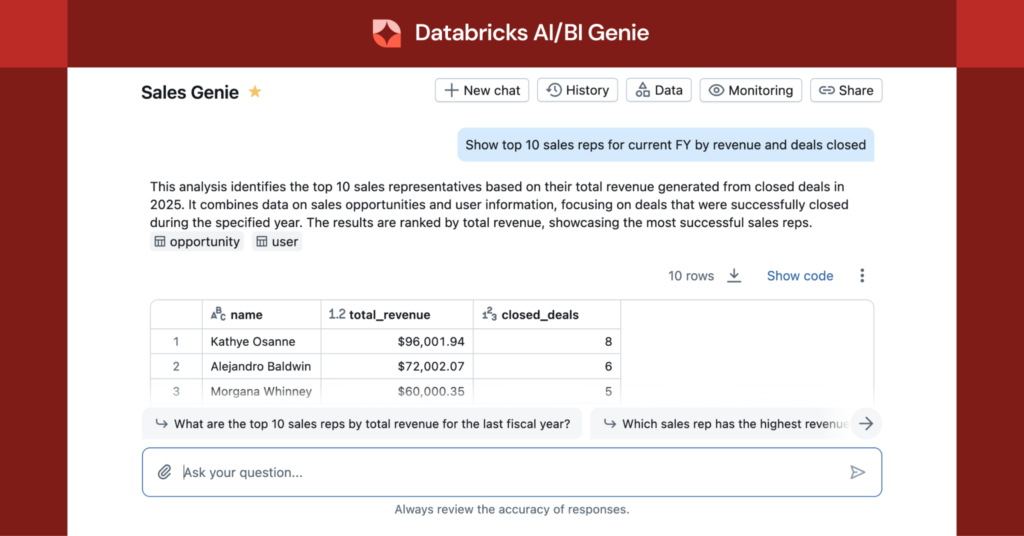
Source: Databricks Documentation
The honest hidden cost: curation
This is the part of the Genie story I wish someone had told me before my first deployment. The quality of Genie’s answers is exactly as good as the quality of your semantic layer.
If your Unity Catalog tables have column names like cust_d_v2_final with no comments, no synonyms, and no certified metrics, Genie will guess. And business users will lose trust in it the first time it produces a confident wrong answer.
This is the same problem I wrote about in The Lost Art of Data Modeling in the Databricks Lakehouse. Genie does not let you skip the data modeling work. It rewards the teams that did it. Medallion Architecture, Unity Catalog hierarchy, properly documented gold tables, certified metric views: these are the prerequisites, not the nice-to-haves.
The teams getting real value from Genie today are the ones that already had a mature semantic layer. The teams getting frustrated are the ones who assumed the AI would compensate for years of skipped governance work.
So, should you keep Power BI or Tableau?
Yes. Almost always yes.
The question is not Genie versus Power BI. The question is what each tool is replacing in your stack:
| Tool | What it replaces |
| Power BI / Tableau | Static reports, governed dashboards, executive reporting |
| Genie | Ad-hoc analyst requests, exploratory questions, dashboard follow-ups |
| Genie + embedded BI | Customer-facing self-service analytics in your own product |
If you are already on Databricks, adding Genie is a low-risk, high-leverage move, provided you have done the governance work. If you are using Genie as a reason to defer that governance work, you are setting up a credibility problem with your business users that will take quarters to recover from.
What I tell clients in the first architecture call
Three things, every time.
First, do not replace what is working. Power BI and Tableau have decades of investment in pixel-perfect reporting and governance workflows that Genie does not try to match. Keep them. Connect them properly to Databricks SQL Warehouses on Unity Catalog gold tables.
Second, treat Genie as a new persona’s tool, not a replacement tool. The persona is the curious business user who today files a ticket and waits. Build a Genie Space for them, with curated metrics and clear instructions, and measure how many tickets disappear.
Third, do the data modeling work first. Genie will expose every weakness in your semantic layer faster than any audit ever did. That is actually a gift. It just does not feel like one in week two.
The same discipline I wrote about in CI/CD for the Lakehouse applies here. You cannot bolt good outcomes onto a fragile foundation, no matter how impressive the AI on top is.
The bottom line
Genie is worth it. It is also not what most clients think it is when they first ask about it.
It is not a dashboard tool. It is not a Power BI killer. It is not a shortcut around data modeling. It is a conversational analytics layer that turns a well-governed Lakehouse into a self-service experience, and it works exactly as well as the foundation underneath it.
At Entrada, we have helped clients deploy Genie alongside Power BI, Tableau, and in some cases both. The pattern that works is the same every time: invest in the semantic layer, keep the BI tools that already work, and let Genie own the questions nobody wants to write a ticket for.
That is the answer worth giving your CIO.
If you are evaluating Databricks AI/BI Genie for your organization and want a candid second opinion before you commit, get in touch with the Entrada team. We help clients architect the Lakehouse foundation that makes tools like Genie actually deliver on the demo.